OpenClaw 101: Setup, Channels, Troubleshooting, and Daily Operations
Updated regularly · By Christopher Kvamme
The complete starting point for OpenClaw. This guide walks through the full path from choosing a server to running a production agent, linking to every deep-dive guide along the way.
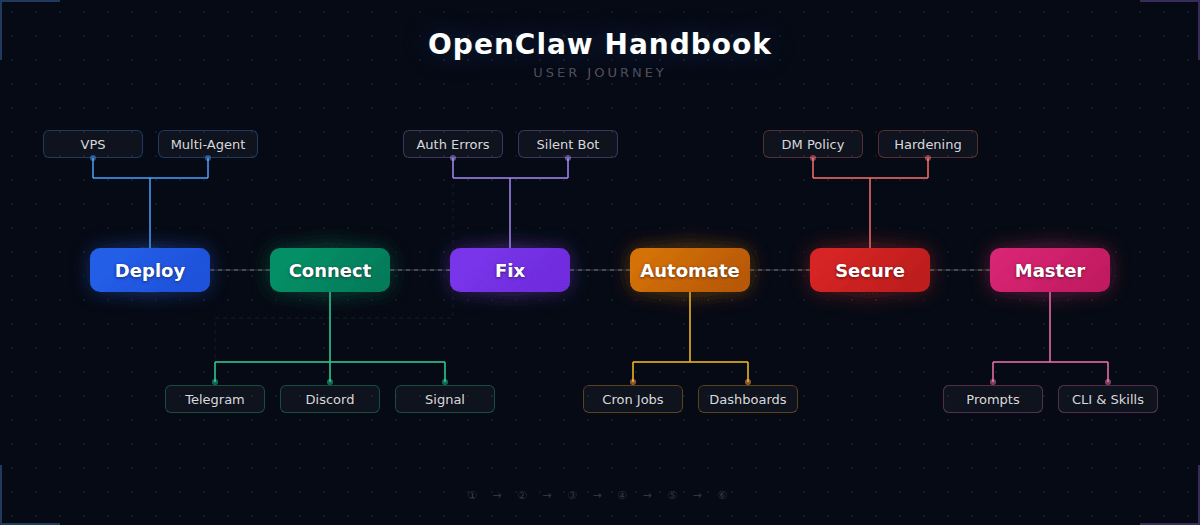
Key takeaways
- ✓OpenClaw is a self-hosted AI agent that connects to your chat apps and runs on a $6/month VPS
- ✓Most problems happen during channel setup and pairing — the troubleshooting section covers every common error
- ✓Once running, cron jobs, dashboards, and custom workflows turn it into daily infrastructure
- ✓This page links to every OpenClaw guide on the site, organized by what you need to do next
What is OpenClaw and who is this guide for
OpenClaw is a self-hosted AI agent platform. You install it on a Linux server, connect it to a messaging app like Telegram or Discord, and it becomes a programmable assistant you fully own. No vendor lock-in, no monthly platform fees. The only ongoing costs are your server ($6/month is enough) and whatever model API you connect.
This page is the front door to every OpenClaw guide on Stack-Junkie. If you are new, start at the top and follow the path. If something is already broken, jump to troubleshooting. If you want to go deeper into cost control, CLI commands, or custom skills, the power user section is at the bottom. Every section links to the detailed guides that cover it.
🆕 New to OpenClaw?
Start with hosting and get a working install.
↓ How to install OpenClaw✅ Already running?
Connect a chat app or automate workflows.
↓ Connect a chat app🔧 Something broke?
Error fixes and silent bot diagnosis.
↓ Fix common problemsHow to install OpenClaw on a VPS
The most common way to run OpenClaw is on a small Linux VPS. DigitalOcean, Hetzner, and Vultr are the most popular picks in the community. A $6/month droplet with 1GB of RAM is enough to run one agent — OpenClaw itself is lightweight, and most of the cost goes to whichever model API you connect.
Your first decision is where to host. The cost and deployment experience vary between providers, and the VPS comparison guide breaks down the real differences. If you already have a server, skip straight to the DigitalOcean setup walkthrough (the steps apply to any Ubuntu VPS). If you want more than one agent on the same machine, the multi-agent guide covers the process.
Deployment & hosting12 articles
Migrate from Claude Code to OpenClaw: Step-by-Step→OpenClaw First-Run Wizard: What Every Option Does→OpenClaw on Raspberry Pi: Self-Host Your Agent for $35→OpenClaw API Cost Breakdown: Real Numbers From 49 Days→OpenClaw Session Types Explained: Main, Isolated, and Named→OpenClaw on Windows: WSL2 and Native Install Guide→OpenClaw Workspace Files: MEMORY, AGENTS, and SOUL Guide→How to Set Up Your OpenClaw Model Provider (Step-by-Step)→Deploy OpenClaw on DigitalOcean: Droplet vs App Platform→How to Run Multiple OpenClaw Agents on a Single Server→Best VPS for OpenClaw in 2026: 5 Providers Compared→Run OpenClaw on DigitalOcean: $6/Month VPS Setup→How to connect OpenClaw to a chat app
Once OpenClaw is alive on a server, the next step is connecting it to a messaging platform so you can actually talk to it. Telegram is the most popular starting point — BotFather setup is fast, free, and we have the deepest troubleshooting coverage for it. Discord is the second most common, especially for people who already run community servers.
Each platform has its own setup flow and its own failure modes. Telegram users run into allowFrom confusion and 401 errors. Discord users hit missing intents and permission denials. The guides below are organized by platform — pick yours and follow the setup guide first, then use the error-specific articles if something goes wrong.
How to fix common OpenClaw problems
If OpenClaw is silent, crashing, or refusing to pair, start here. These are the most common failure modes, grouped by symptom rather than platform. A large percentage of readers arrive at this section through search with a specific error message, so each guide targets one problem and walks through the full fix.
npm install failedbot not replyingpairing required 1008gateway crashes401 unauthorizedsilent bot in groupwrong channel/servermissing intents 4014
Troubleshooting5 articles
What Does openclaw doctor --fix Do? Every Warning Explained→How to Approve OpenClaw Pairing: Fix Pairing Required Errors→Fix OpenClaw Gateway Connect Failed: Pairing Required (1008)→OpenClaw Troubleshooting: Fix Gateway, Pairing, and Channel Errors→Fix 'npm install failed for openclaw@latest' and Other Install Errors→How to automate OpenClaw with cron jobs and dashboards
This is where OpenClaw stops being a setup project and starts being useful. Scheduled automations, real-time dashboards, morning briefings, and repeatable workflows that run without you touching anything. If you got this far, you have a working agent. Now make it do something.
Automation & operations7 articles
OpenClaw TikTok Marketing: How the Larry Skill Works→OpenClaw Automated Journaling: Daily Cron Job Setup→OpenClaw Daily Idea Radar: Automate Product Discovery→Build a 24/7 Dashboard for Your AI Agent in 48 Hours→How to Set Up OpenClaw Cron Jobs (With Examples You Can Copy)→16 OpenClaw Workflows That Turn Your Agent Into Infrastructure→10-Minute Smart Morning Briefing That Actually Works→How to secure and harden your OpenClaw agent
If you rely on OpenClaw for anything real, lock it down. The gateway binds to localhost by default and requires pairing, but there are several hardening steps that most operators skip. DM policy controls who can talk to your agent and how. Skills from ClawHub run code in your environment, so read the safe skills installation guide before you install anything from the marketplace.
Security6 articles
OpenClaw DM Policy: How All Four Modes Actually Work→Is OpenClaw Safe? Malwarebytes Report Reviewed→ClawHub Skills: How to Install Without Getting Compromised→OpenClaw Security Audit Command: Run, Fix, and Automate→OpenClaw Security Hardening Playbook: 5 Steps to Lock It Down→OpenClaw Security Guide: 7 Fixes to Harden Your AI Agent→OpenClaw power user guides and advanced configuration
Everything above gets you to a working, secure, automated agent. This section is optional depth for operators who want tighter control. AGENTS.md is the most important customization lever — it controls how your agent reasons, responds, and handles ambiguity. Cost control matters once you run multiple sessions or use expensive models. The skills system lets you extend what the agent can do without starting from scratch.
Configuration & advanced19 articles
OpenClaw Backup and Recovery: Protect Agent Memory→OpenClaw Config Reference: Every openclaw.json Option→OpenClaw Notification Routing: Send Alerts Anywhere→OpenClaw OpenRouter Setup: One API Key for Hundreds of Models→OpenClaw Starter Kit: 30 Templates for Faster Setup→OpenClaw Subagent Orchestration: Parallel Tasks Guide→OpenClaw Voice Mode: Telegram Voice Notes and TTS Setup→QLoRA Fine-Tuning on a Consumer GPU: Unsloth Step by Step→7 Best OpenClaw Alternatives in 2026 (Lightweight, Cloud, and Self-Hosted)→How OpenClaw Agents Learn Without Reinforcement Learning→OpenClaw vs ArkClaw: Self-Hosted Agent or ByteDance Cloud?→OpenClaw-RL Explained: What It Is and What It Takes to Run→How to Write AGENTS.md, SOUL.md, and TOOLS.md for OpenClaw→OpenClaw AGENTS.md: Build Rules Your Agent Won't Forget→OpenClaw Logs Command: Monitor Your Agent in Real Time→OpenClaw Cost Control: Cut API Spending, Keep Your Agent→OpenClaw CLI Commands (2026): Operator Defaults, Flags, and Debug Notes→Fix OpenClaw Context Loss: Savestate, Resume, and Compaction Settings→How to Install OpenClaw Skills From ClawHub (+ Build Your Own)→FAQ
Is OpenClaw free to use?
OpenClaw itself is free and open source. The ongoing costs are your server hosting (as low as $6/month on DigitalOcean) and the API key for your model provider. Light usage with a budget model like GPT-4o Mini typically runs under $15/month total.
What is the cheapest way to run OpenClaw?
A $6/month DigitalOcean droplet with GPT-4o Mini as your default model. Total cost depends on usage volume, but most solo operators spend $8-20/month including hosting and API. The cost control guide covers specific optimization strategies.
Which chat app works best with OpenClaw?
Telegram for most people. Setup is free through BotFather, takes about 5 minutes, and has the most troubleshooting documentation. Discord is a close second if you already run a server. Slack, Signal, WhatsApp, and several others are also supported.
Why is my OpenClaw bot not responding?
The most common causes are incorrect allowFrom settings, an expired bot token, missing gateway pairing, or the bot lacking permission to read group messages. Start with the troubleshooting guide for the full diagnostic flow.
Can I run OpenClaw on a Raspberry Pi?
Technically yes, but a small VPS is more reliable for 24/7 operation. OpenClaw needs at least 1GB of RAM and benefits from consistent uptime. A used mini PC is a better local option than a Pi if you want to avoid cloud hosting.
How do I update OpenClaw to the latest version?
Run npm update -g openclaw and restart the gateway. Run openclaw doctor after to check for anything that needs attention.