How to Run Multiple OpenClaw Agents on a Single Server
OpenClaw was previously known as Clawdbot and Moltbot. This guide applies to all versions.
OpenClaw multi-agent setup from scratch. Configure agents.list, write bindings, route by channel or sender, and set per-agent sandboxes on one server.
Key takeaways
- Each OpenClaw agent has its own workspace,
agentDir, and session store. Never shareagentDiracross agents. - Bindings route inbound messages using an 8-tier precedence system. Most-specific match wins.
- Skills can be per-agent (in the agent's workspace) or shared across all agents via
~/.openclaw/skills. - Per-agent sandbox and tool restrictions became available in v2026.1.6.
- For most single-user setups, multi-agent is overkill. Use it when you need real isolation, not just multiple channels.
OpenClaw Starter Kit: If you are just getting started, the OpenClaw Starter Kit bundles config templates, workspace file examples, and skills we actively use. It covers the setup steps in this guide.
Always review commands your agent suggests before approving them. Don't paste prompts from sources you don't trust.
Fixes when it breaks. Workflows when it doesn't.
OpenClaw guides, configs, and troubleshooting notes. Every two weeks.
OpenClaw multi-agent architecture: what changes from single-agent
A single OpenClaw agent is three things: a workspace (files and persona rules), an agentDir (auth profiles, model registry, per-agent config), and a session store (chat history and routing state). In single-agent mode, all three default to ~/.openclaw/workspace, ~/.openclaw/agents/main/agent, and ~/.openclaw/agents/main/sessions respectively. The agentId is main.
Multi-agent mode doesn't change the Gateway process. One openclaw gateway process still runs. What changes is that the Gateway now manages multiple agent brains, each fully isolated:
| What's shared | What's isolated per agent |
|---|---|
Gateway process (openclaw gateway) | Workspace files (AGENTS.md, SOUL.md, USER.md) |
Global tools.elevated setting | agentDir (auth profiles, model registry) |
openclaw.json file | Session store and chat history |
| Global channel accounts (optional) | Per-agent skills (<workspace>/skills) |
| Sandbox and tool allow/deny lists (v2026.1.6+) |
The key thing to understand: workspace is the "brain." agentDir is the "identity card." Sessions are the "memory." You can run two agents with completely different personas, different channel credentials, different models, and different tool restrictions. All from one server, one Gateway, one config file.
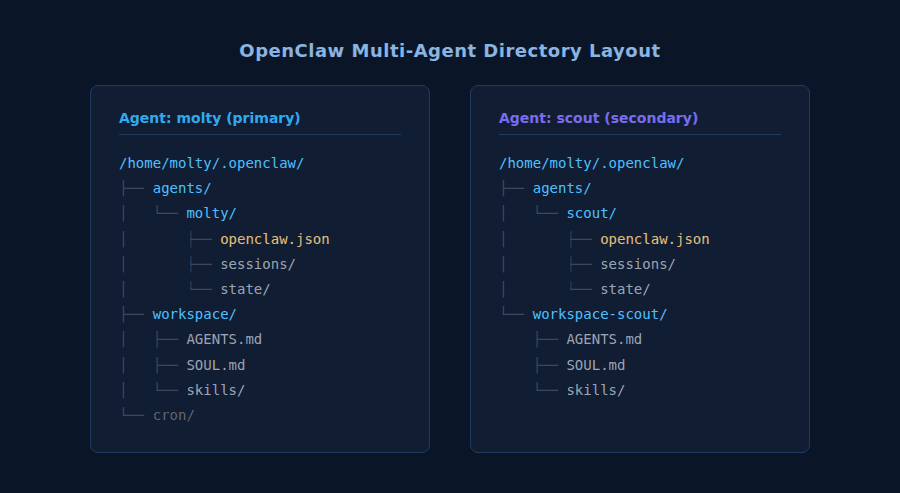
How to add a new agent with openclaw agents add
The fastest way to create a new isolated agent is the agents add wizard. It provisions the workspace, agentDir, and session directory automatically.
openclaw agents list --bindings. Then show me the resulting directory structure under ~/.openclaw/agents/.Always review commands your agent suggests before approving them. Don't paste prompts from sources you don't trust.
openclaw.json config: agents.list fields explained
Every agent, binding, and routing rule lives in one file: ~/.openclaw/openclaw.json (or the path set in OPENCLAW_CONFIG_PATH). The file uses JSON5 format, so you can add comments to document why a binding exists.
The agents.list array defines every agent the Gateway manages. Here are the fields you'll actually use:
{
  agents: {
    list: [
      {
        id: "main",
        default: true,
        name: "Main Agent",
        workspace: "~/.openclaw/workspace-main",
        agentDir: "~/.openclaw/agents/main/agent",
        model: "anthropic/claude-opus-4-6",
        identity: { name: "Molty" },
        groupChat: {
          mentionPatterns: ["@molty", "@main"],
        },
        sandbox: {
          mode: "off",
        },
      },
      {
        id: "coding",
        name: "Coding Agent",
        workspace: "~/.openclaw/workspace-coding",
        agentDir: "~/.openclaw/agents/coding/agent",
        model: "anthropic/claude-sonnet-4-5",
      },
    ],
  },
}
Field reference:
| Field | Required | Notes |
|---|---|---|
id | Yes | Unique string. Used in bindings and session keys. |
workspace | Recommended | Path to agent workspace. Defaults to ~/.openclaw/workspace-<id>. |
agentDir | Recommended | Per-agent state dir. Defaults to ~/.openclaw/agents/<id>/agent. |
name | No | Display name for logs and UI. |
default | No | If true, unmatched messages go to this agent. First in list wins if none set. |
model | No | Override the global default model for this agent. |
identity | No | Sets display name in channel messages (e.g., bot username shown to users). |
groupChat.mentionPatterns | No | Strings that trigger the agent in group chats. |
sandbox | No | Per-agent sandbox config. mode: "off" disables, mode: "all" enforces. |
tools | No | Per-agent tool allow/deny lists. See sandbox section below. |
One rule that the official docs are direct about: never reuse agentDir across agents. If two agents point to the same agentDir, they'll overwrite each other's auth-profiles.json. The symptoms are subtle: random authentication failures, session state that doesn't make sense. The fix is to give each agent its own path.
Bindings and routing: how OpenClaw decides which agent gets a message
A binding connects a channel event (a message arriving from a specific place) to an agent. When a message arrives, OpenClaw evaluates bindings in deterministic order. Most-specific match wins:
peermatch (exact DM/group ID)parentPeermatch (thread inheritance)guildId + roles(Discord role routing)guildId(Discord server)teamId(Slack workspace)accountIdmatch for a channel- Channel-level match (
accountId: "*") - Fallback to default agent
If two bindings match at the same tier, config order wins. First one listed takes the message.
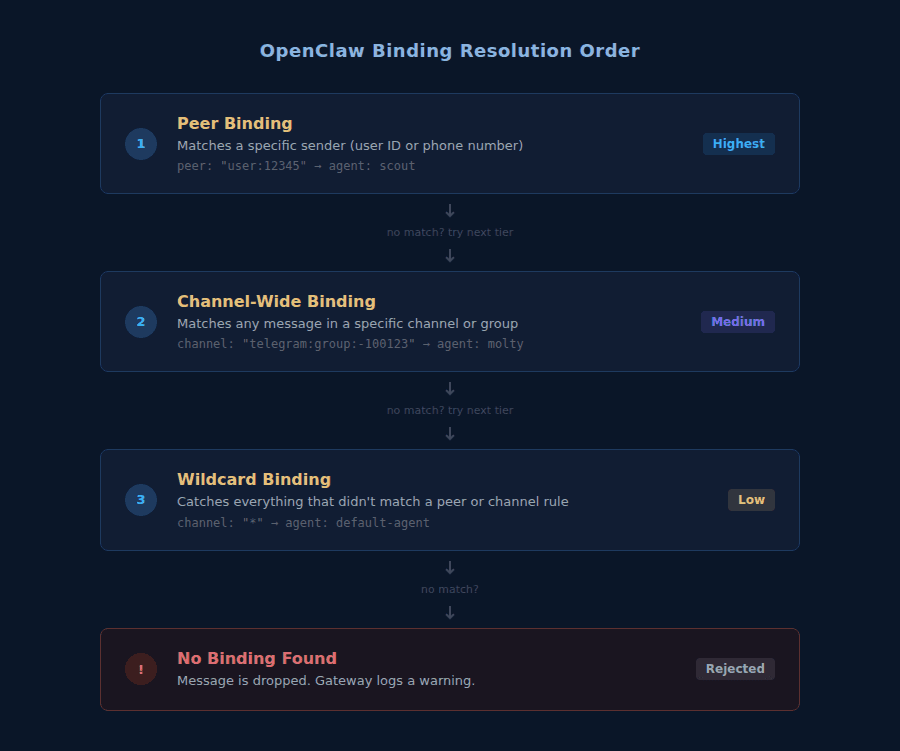
A binding looks like this:
{
  bindings: [
    {
      agentId: "coding",
      match: { channel: "telegram", accountId: "coding-bot" },
    },
    {
      agentId: "main",
      match: { channel: "telegram", accountId: "default" },
    },
  ],
}
A few things that catch people:
Omitting accountId: A binding without accountId matches the default account only, not all accounts for that channel. If you add a second Telegram bot later, messages to it won't hit this binding. Use accountId: "*" for a channel-wide fallback that covers all accounts.
Multiple match fields use AND logic: If you write { channel: "discord", guildId: "123", peer: { kind: "direct", id: "456" } }, ALL three must match. There's no OR logic in a single binding.
Order matters within a tier: Peer bindings (tier 1) always beat channel-wide fallbacks (tier 7) regardless of config order. But if you have two bindings at the same tier (for example, two peer-specific bindings), the first one in config order wins.
Real config patterns: Telegram, Discord, and WhatsApp
Each platform needs its own token and account entry. These patterns come from the official OpenClaw docs and cover the three most common setups.
Telegram: one bot per agent
Each Telegram bot has its own token from BotFather. The accountId in the binding connects the token to the agent:
{
  agents: {
    list: [
      { id: "main", workspace: "~/.openclaw/workspace-main" },
      { id: "alerts", workspace: "~/.openclaw/workspace-alerts" },
    ],
  },
  bindings: [
    { agentId: "main", match: { channel: "telegram", accountId: "default" } },
    { agentId: "alerts", match: { channel: "telegram", accountId: "alerts" } },
  ],
  channels: {
    telegram: {
      accounts: {
        default: {
          botToken: "123456:ABC...",
          dmPolicy: "pairing",
        },
        alerts: {
          botToken: "987654:XYZ...",
          dmPolicy: "allowlist",
          allowFrom: ["tg:123456789"],
        },
      },
    },
  },
}
The alerts agent uses an allowlist, so it only responds to one specific Telegram user ID. That's a common pattern for monitoring agents: lock them down to one sender so they can't be triggered accidentally.
For the full Telegram setup flow, see the OpenClaw Telegram Setup Guide.
Discord: one bot application per agent
Discord requires a separate bot application and token for each agent. Both bots can be in the same server, in different channels:
{
  agents: {
    list: [
      { id: "main", workspace: "~/.openclaw/workspace-main" },
      { id: "coding", workspace: "~/.openclaw/workspace-coding" },
    ],
  },
  bindings: [
    { agentId: "main", match: { channel: "discord", accountId: "default" } },
    { agentId: "coding", match: { channel: "discord", accountId: "coding" } },
  ],
  channels: {
    discord: {
      groupPolicy: "allowlist",
      accounts: {
        default: {
          token: "DISCORD_BOT_TOKEN_MAIN",
          guilds: {
            "123456789012345678": {
              channels: {
                "222222222222222222": { allow: true, requireMention: false },
              },
            },
          },
        },
        coding: {
          token: "DISCORD_BOT_TOKEN_CODING",
          guilds: {
            "123456789012345678": {
              channels: {
                "333333333333333333": { allow: true, requireMention: false },
              },
            },
          },
        },
      },
    },
  },
}
Both tokens live under their respective accounts keys. Invite each bot to your server separately and enable Message Content Intent for each. The OpenClaw Discord Setup Guide covers the Discord Developer Portal steps.
WhatsApp: different model per channel
This is the pattern I run myself: route WhatsApp to a fast everyday agent and Telegram to a more capable model for deeper work:
{
  agents: {
    list: [
      {
        id: "chat",
        name: "Everyday",
        workspace: "~/.openclaw/workspace-chat",
        model: "anthropic/claude-sonnet-4-5",
      },
      {
        id: "opus",
        name: "Deep Work",
        workspace: "~/.openclaw/workspace-opus",
        model: "anthropic/claude-opus-4-6",
      },
    ],
  },
  bindings: [
    { agentId: "chat", match: { channel: "whatsapp" } },
    { agentId: "opus", match: { channel: "telegram" } },
  ],
}
Bindings here are channel-wide, so every WhatsApp message goes to the Sonnet agent and every Telegram message goes to Opus. Clean, readable, and easy to debug.
WhatsApp: same number, route by sender
You can split one WhatsApp account across multiple agents using peer matching. Each sender E.164 number routes to a different agent:
{
  agents: {
    list: [
      { id: "alex", workspace: "~/.openclaw/workspace-alex" },
      { id: "mia", workspace: "~/.openclaw/workspace-mia" },
    ],
  },
  bindings: [
    {
      agentId: "alex",
      match: { channel: "whatsapp", peer: { kind: "direct", id: "+15551230001" } },
    },
    {
      agentId: "mia",
      match: { channel: "whatsapp", peer: { kind: "direct", id: "+15551230002" } },
    },
  ],
  channels: {
    whatsapp: {
      dmPolicy: "allowlist",
      allowFrom: ["+15551230001", "+15551230002"],
    },
  },
}
Keep in mind: replies still come from the same WhatsApp number. The agents are isolated for workspace and sessions, but the sender identity on WhatsApp is the same account. For true per-person sender identity, you need separate WhatsApp accounts (and two phone numbers).
Per-agent workspace files: AGENTS.md, SOUL.md, and skills
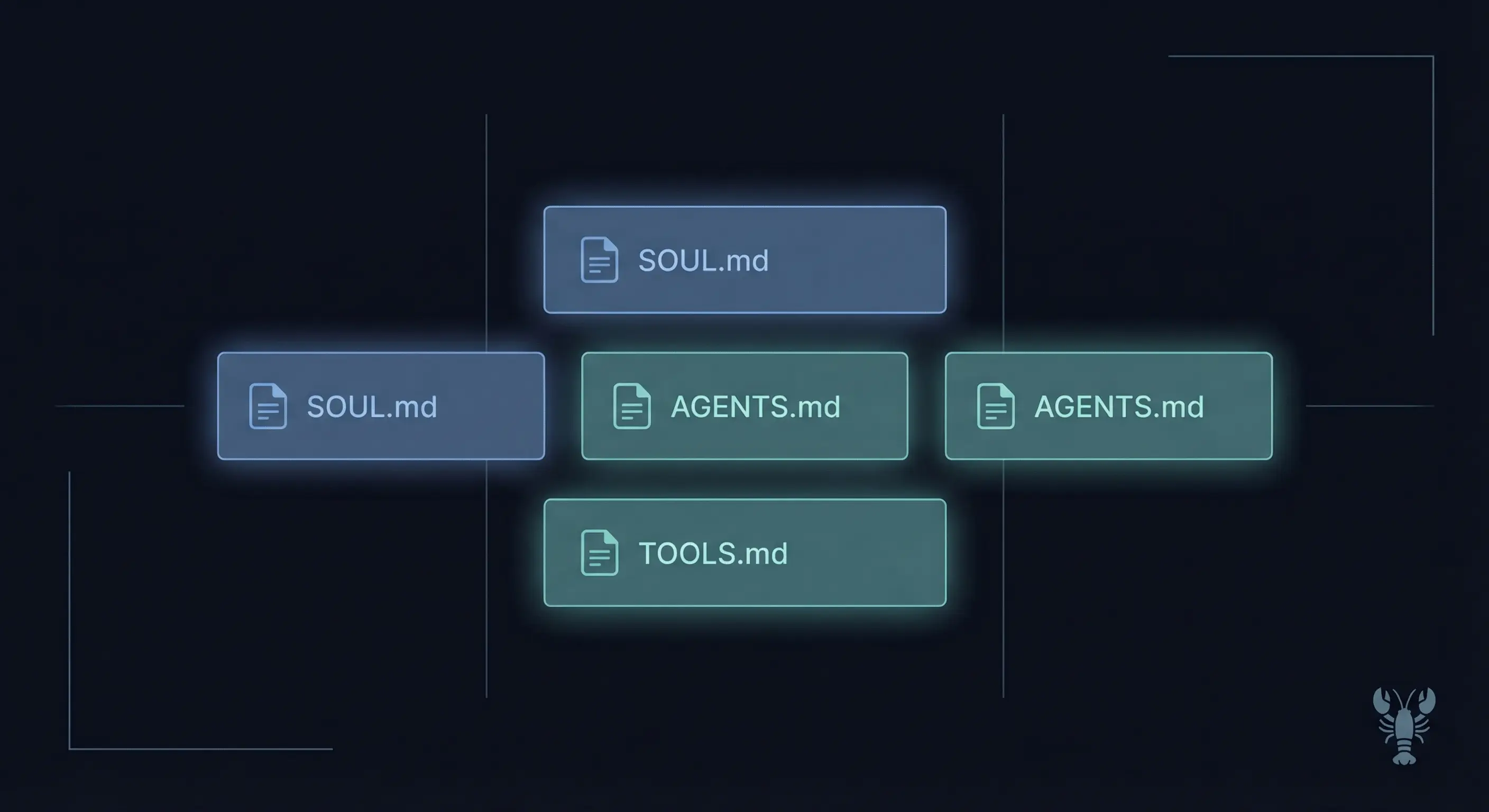
Agent personas are genuinely separate. Each workspace has its own AGENTS.md (operational rules), SOUL.md (persona and tone), and USER.md (facts about the person it serves). One agent can be formal and professional; another can be terse and blunt. They don't share memory or context. From a user's perspective, they're talking to completely different systems.
Skills work by the same logic. Per the OpenClaw skills documentation, skill precedence runs from highest to lowest:
<workspace>/skills(agent-exclusive, inside that agent's workspace folder)~/.openclaw/skills(shared managed skills, visible to all agents)- Bundled skills (shipped with the install)
If you want a skill available to all your agents without duplicating it, drop it in ~/.openclaw/skills. If you want a skill exclusive to one agent (so the other agents don't have access), put it in that agent's workspace skills/ folder.
You can also add shared skill folders via skills.load.extraDirs in openclaw.json. Useful if you have a team skills pack you want all agents to load but don't want to put in ~/.openclaw/skills.
Always review commands your agent suggests before approving them. Don't paste prompts from sources you don't trust.
Per-agent sandbox and tool restrictions (v2026.1.6+)
Per-agent sandbox and tool control landed in v2026.1.6. Before that, tool permissions were global. Now you can lock down a specific agent without affecting the rest.
The sandbox config per agent:
{
  agents: {
    list: [
      {
        id: "personal",
        workspace: "~/.openclaw/workspace-personal",
        sandbox: {
          mode: "off",
        },
      },
      {
        id: "family",
        workspace: "~/.openclaw/workspace-family",
        sandbox: {
          mode: "all",
          scope: "agent",
          docker: {
            setupCommand: "apt-get update && apt-get install -y git curl",
          },
        },
        tools: {
          allow: ["read", "exec", "sessions_list"],
          deny: ["write", "edit", "apply_patch", "browser", "canvas", "nodes", "cron"],
        },
      },
    ],
  },
}
The personal agent runs unsandboxed with full tool access. The family agent runs in Docker with a restricted tool set. Guests using the family agent can't write files, open a browser, or trigger cron jobs.
One global restriction that per-agent config can't override: tools.elevated. Per the docs, tools.elevated is sender-based and global. If you need to prevent an agent from doing elevated operations, use deny: ["exec"] in that agent's tools block. That blocks exec entirely, which achieves the same effect.
The setupCommand field under sandbox.docker runs once on container creation. It doesn't run on every message. Use it to pre-install packages into the sandbox environment, not for per-request setup.
One more thing: scope: "agent" gives each agent its own container. scope: "shared" puts all sandboxed agents into one container. Per-agent sandbox.docker.* overrides are silently ignored when scope resolves to "shared".
Common OpenClaw multi-agent errors and how to fix them
Most multi-agent problems come down to six mistakes. Here are all of them:
1. Shared agentDir across agents. This is the most common one. If two entries in agents.list point to the same agentDir, they share auth-profiles.json. Whichever agent writes last wins. The other agent loses its credentials silently. Fix: give every agent a unique path.
2. Missing accountId on a binding. A binding without accountId only matches the default channel account. If you add a second Telegram bot and don't update your bindings with the new accountId, messages to that bot route to the default agent, not the one you intended. Check with openclaw agents list --bindings.
3. Assuming the workspace is sandboxed. The workspace is the agent's default working directory, but it's not a hard sandbox. Absolute paths can reach outside the workspace unless sandbox.mode: "all" is set. For any agent that might run code from untrusted input, enable sandboxing.
4. Expecting tools.elevated to be per-agent. It isn't. tools.elevated is global and sender-based. If you need to prevent a specific agent from running elevated commands, use tools.deny: ["exec"] in that agent's config.
5. Binding order at the same tier. When two bindings match at the same specificity tier, the first one in config order wins. If you're not getting the routing you expect, check whether a more general binding is listed before a specific one.
6. Forgetting agentToAgent is off by default. If you want agents to message each other (for example, a workflow where one agent hands off to another), you have to explicitly enable it:
{
  tools: {
    agentToAgent: {
      enabled: true,
      allow: ["main", "coding"],
    },
  },
}
Without the allow list scoped to specific agents, enabling agentToAgent opens all agents to each other. That's rarely what you want.
When to use multi-agent (and when not to)
Multi-agent solves real problems in a few specific situations. For most setups, it's unnecessary complexity.
Use it when:
- Multiple people share one server and need real data isolation
- You want different personas with genuinely different tools, models, and memory
- You're running an untrusted agent (family group, shared bot) alongside a personal agent with broader permissions
- You need to track model costs per agent separately
Skip it when:
- You're the only user who just wants to talk to one agent across multiple channels. That's single-agent multi-channel, which is the default.
- You want parallel tasks. That's subagents, not separate agents in
agents.list. Two very different things. - You want to route messages based on content. A single agent with a good
AGENTS.mdrouting table handles that. - You're adding complexity to feel like you're making progress.
The subagents vs agents confusion is the one I see most often. Subagents are temporary parallel workers spawned inside a session. They share the parent agent's workspace and context. agents.list entries are persistent, isolated brains with their own memory. Not the same problem, not the same solution.
OpenClaw multi-agent glossary: agentId, agentDir, binding, workspace
agentId: The unique string that identifies one OpenClaw agent brain. Used in bindings, session keys, and directory paths.
agentDir: The per-agent state directory. Stores auth-profiles.json and the model registry. Never share this path across two agents.
binding: A routing rule that connects inbound messages from a channel to a specific agentId. Evaluated in deterministic precedence order.
accountId: One channel login instance. For example, two WhatsApp numbers on the same server would be two different accountId values.
workspace: The agent's working directory. Contains AGENTS.md, SOUL.md, USER.md, skills, and any files the agent creates. Not a hard sandbox by default.
FAQ
What is the difference between OpenClaw agents and subagents?
OpenClaw agents (entries in agents.list) are persistent, isolated brains with their own workspace, auth profiles, and session history. They run continuously and handle inbound messages from channel bindings. Subagents are temporary parallel workers that an agent spawns mid-session to handle specific tasks. Subagents share the parent agent's context and don't persist after the task completes. Use agents.list for real isolation; use subagents for parallel task execution.
Can two OpenClaw agents share the same Telegram bot token?
No. A Telegram bot token is tied to one bot identity, and the OpenClaw Gateway maintains one connection per token. If two agents used the same token, they'd compete for messages and you'd get unpredictable routing. Create one bot per agent via BotFather. Each gets a unique token stored under its respective accountId in channels.telegram.accounts.
How do I share skills between multiple OpenClaw agents?
Install the skill into ~/.openclaw/skills instead of a specific workspace. All agents on the same machine load skills from that shared location. If you need a skill available to some agents but not others, put it in those agents' workspace skills/ folders. Per the skills documentation, workspace-level skills take precedence over shared skills, so you can also override a shared skill for one agent by putting a modified version in its workspace.
Does each agent need its own model API key in OpenClaw?
No. Model API keys are managed globally in OpenClaw and apply to all agents by default. Each agent can specify a different model in its agents.list entry (for example, one agent uses Sonnet and another uses Opus), but they pull from the same API key pool. You don't need to configure separate keys per agent unless you're using different accounts for billing reasons.
What happens if a message doesn't match any binding in OpenClaw?
It goes to the default agent. The default is whichever agent in agents.list has default: true. If none is marked default, the first agent in the list gets it. If agents.list is empty or missing, the legacy single-agent main handles it. To see your current routing, run openclaw agents list --bindings and look for which agent has no explicit binding conditions. That's your fallback.
Evidence & Methodology
All config examples in this article come directly from the official OpenClaw multi-agent documentation. Skills precedence rules are from the OpenClaw skills documentation. No config examples were invented or assumed; every field and value in this guide has a documented source.
Related Resources
- OpenClaw Telegram Setup Guide: Create a Telegram bot for each agent
- OpenClaw Discord Setup Guide: One bot per agent, Discord Developer Portal steps
- Best VPS for OpenClaw: Hosting options compared
- Run OpenClaw in Docker: Container-based deployment with sandboxing
- OpenClaw Skills and ClawHub: Install and manage skills
- OpenClaw Security Guide: Harden your agents
- OpenClaw Cron Jobs Guide: Automate with subagents
Changelog
| Date | Change |
|---|---|
| 2026-03-08 | Initial publication |
Fixes when it breaks. Workflows when it doesn't.
OpenClaw guides, configs, and troubleshooting notes. Every two weeks.