OpenClaw Security Audit Command: Run, Fix, and Automate
OpenClaw was previously known as Clawdbot and Moltbot. This guide applies to all versions.
Run openclaw security audit to scan for misconfigurations. Use --fix to auto-remediate and --deep for extended checks. Every finding explained with fixes.
Key takeaways
- Run
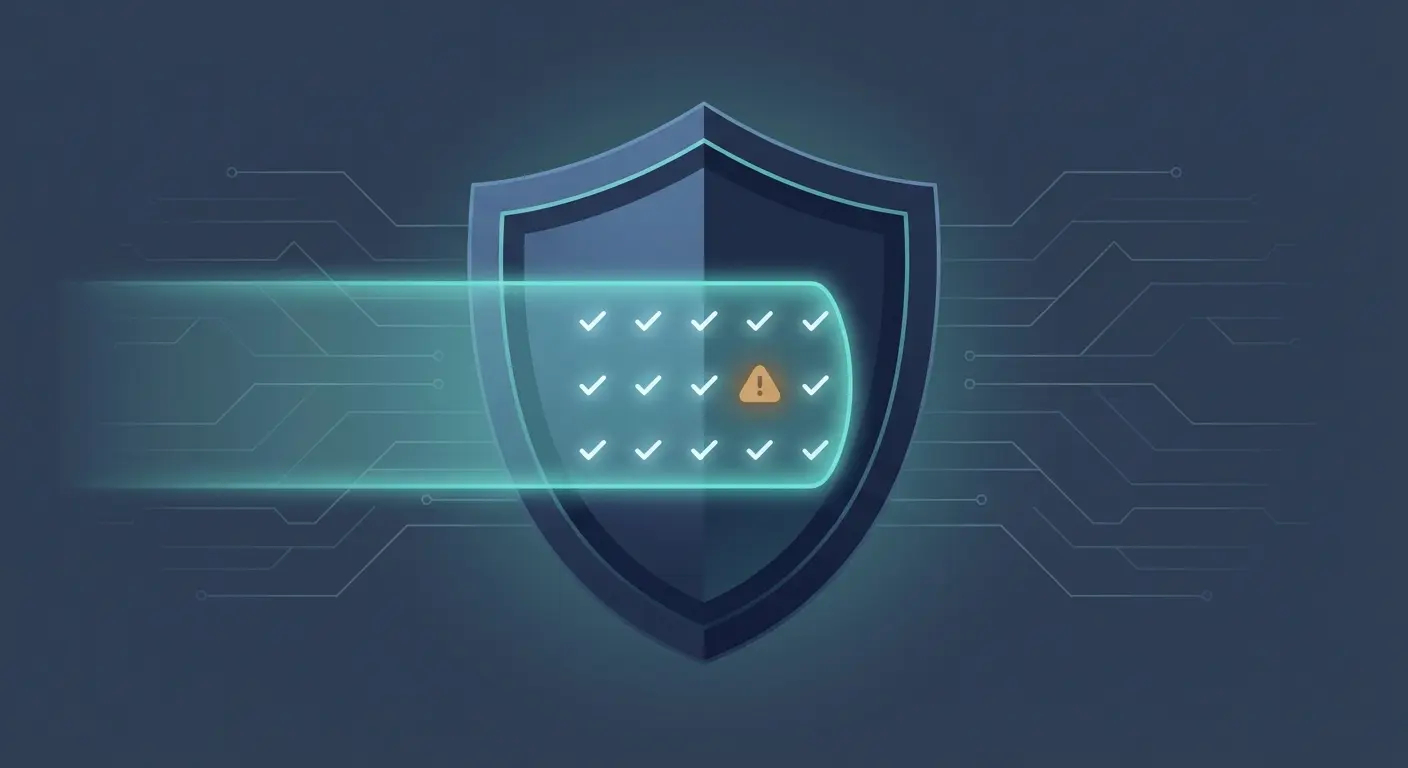
openclaw security audit --deepto check your deployment against 78 security checks covering gateway config, file permissions, channel access, model settings, and more. - Add
--fixto automatically remediate file permissions and open group policies. Critical findings like exposed gateway ports require manual fixes. - Findings have three severity levels: Critical (fix immediately), Warn (fix soon), and Info (no action required). The guide walks through manual fixes for the most common findings in each category.
- Pipe the output with
--jsoninto a CI pipeline or monitoring script to catch regressions after config changes without running a manual scan each time.
Run openclaw security audit --deep to scan your OpenClaw instance for misconfigurations across 78 checks. Add --fix to auto-remediate file permissions and open group policies. This guide explains every severity level, walks through real output line by line, and shows manual fixes for findings that --fix can't handle. For broader hardening beyond what the audit covers, see the OpenClaw security hardening playbook.
Always review commands your agent suggests before approving them. Don't paste prompts from sources you don't trust.
Fixes when it breaks. Workflows when it doesn't.
OpenClaw guides, configs, and troubleshooting notes. Every two weeks.
What does the security audit actually check?
The audit inspects your local OpenClaw configuration and state files for common security misconfigurations. It doesn't phone home, doesn't require network access for the basic scan, and runs entirely against your local config.
There are 78 unique checks organized into categories:
| Category | What It Covers | Example Check |
|---|---|---|
gateway.* | Auth, binding, token strength, proxy config | gateway.bind_no_auth |
fs.* | File and directory permissions | fs.state_dir.perms_readable |
channels.* | Telegram, Discord, Slack allowlists | channels.telegram.groups.allowFrom.missing |
models.* | Model tier and size warnings | models.weak_tier |
sandbox.* | Docker and AppArmor config | sandbox.dangerous_network_mode |
plugins.* | Extension code safety | plugins.code_safety |
hooks.* | Webhook ingress config | hooks.token_too_short |
logging.* | Redaction settings | logging.redact_off |
security.* | Cross-cutting exposure checks | security.exposure.open_groups_with_elevated |
Each finding gets one of three severity levels:
- Critical (31 checks): something is actively dangerous. Fix it now.
- Warn (42 checks): a misconfiguration that could cause problems. Fix it soon.
- Info (5 checks): informational. Understand your attack surface, no action required.
Prerequisites
Before running the audit, confirm you've got the basics:
Check your OpenClaw version:
openclaw --versionThe security audit command has been available since early 2025 releases. If you're on an older version, update first.
Check your Node.js version:
node --versionOpenClaw requires Node.js 18 or later. The audit itself doesn't have additional requirements beyond what OpenClaw needs to run.
Confirm OpenClaw is installed globally:
which openclawIf that returns nothing, you need to install or reinstall. The installation troubleshooting guide covers common install issues.
How do you run the basic audit?
Run it from any directory. No arguments needed:
openclaw security auditHere's what real output looks like on a production instance:
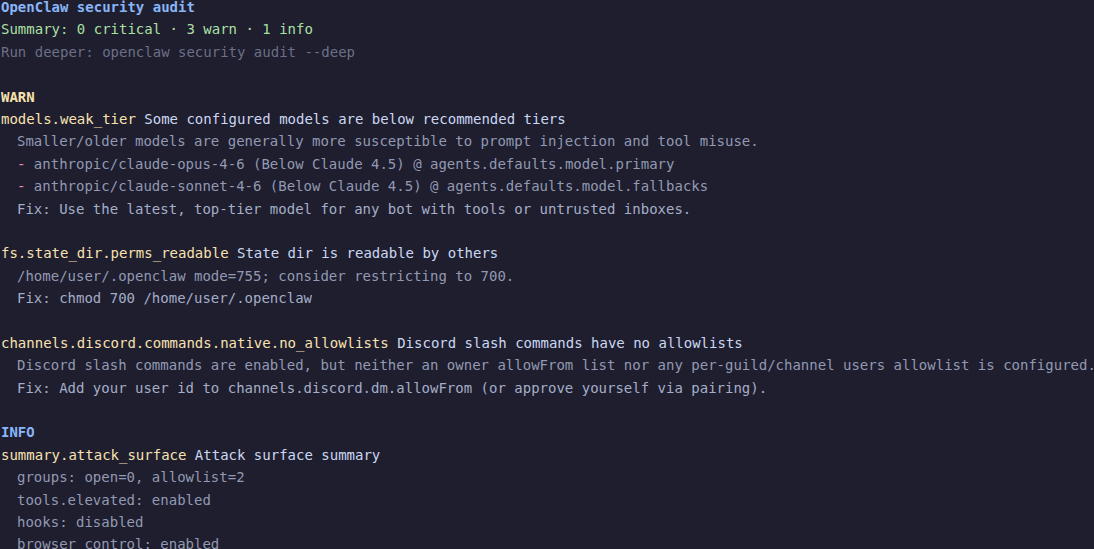
OpenClaw security audit
Summary: 0 critical · 3 warn · 1 info
Run deeper: openclaw security audit --deep

WARN
models.weak_tier Some configured models are below recommended tiers
  Smaller/older models are generally more susceptible to prompt
  injection and tool misuse.
- anthropic/claude-opus-4-6 (Below Claude 4.5) @ agents.defaults.model.primary
- anthropic/claude-sonnet-4-6 (Below Claude 4.5) @ agents.defaults.model.fallbacks
  Fix: Use the latest, top-tier model for any bot with tools or
  untrusted inboxes. Avoid Haiku tiers; prefer GPT-5+ and Claude 4.5+.

fs.state_dir.perms_readable State dir is readable by others
  /home/user/.openclaw mode=755; consider restricting to 700.
  Fix: chmod 700 /home/user/.openclaw

channels.discord.commands.native.no_allowlists Discord slash commands
  have no allowlists
  Discord slash commands are enabled, but neither an owner allowFrom
  list nor any per-guild/channel users allowlist is configured.
  Fix: Add your user id to channels.discord.dm.allowFrom (or approve
  yourself via pairing).

INFO
summary.attack_surface Attack surface summary
  groups: open=0, allowlist=2
  tools.elevated: enabled
  hooks: disabled
  browser control: enabled
Let's break that down.
The summary line tells you the count at each severity. Zero criticals is what you want. Warnings need attention. Info is context.
Each finding follows a consistent format:
- The check ID and title on the first line (e.g.,
models.weak_tier Some configured models are below recommended tiers) - A detail block explaining what the check found and why it matters
- A fix line with the specific remediation step
The attack surface summary at the bottom is your snapshot. It tells you how many groups are open vs. allowlisted, whether elevated tools are enabled, and whether hooks and browser control are active. Read this as "here's what's exposed." It's not a warning, it's a mirror.
What does --deep add?
openclaw security audit --deepThe --deep flag adds live Gateway probe checks. Instead of just reading your config files, it attempts to connect to your running Gateway and test its actual behavior.
What this means in practice: if your Gateway isn't running, the deep checks get skipped. The basic config checks still run. You'll see the same findings as the basic audit plus any additional issues the live probe catches.
The deep checks can detect things like:
- Whether your Gateway is actually bound to the interface you configured
- Whether auth is enforced on the running instance (not just configured)
- Whether the control UI has proper authentication
Run --deep when your Gateway is up. Run basic when you just want to check config before starting it.
If your output looks identical to the basic audit, that usually means the Gateway wasn't reachable during the deep scan, or the live checks didn't find additional issues. Both are fine.
What does --fix actually change?
openclaw security audit --fixThis is the one people are nervous about. Here's exactly what it does and doesn't do.
What --fix changes
Three categories of safe, deterministic fixes:
-
Group policy tightening. Flips
groupPolicy="open"togroupPolicy="allowlist"for any configured channel. Groups that were accepting messages from anyone now require explicit allowlist entries. -
Logging redaction. Sets
logging.redactSensitivefrom"off"to"tools"if it was off. This redacts sensitive content in tool call logs. -
File permission tightening. Runs
chmodon state directories, config files, credential files, and session files to restrict access.
Here's real --fix output:
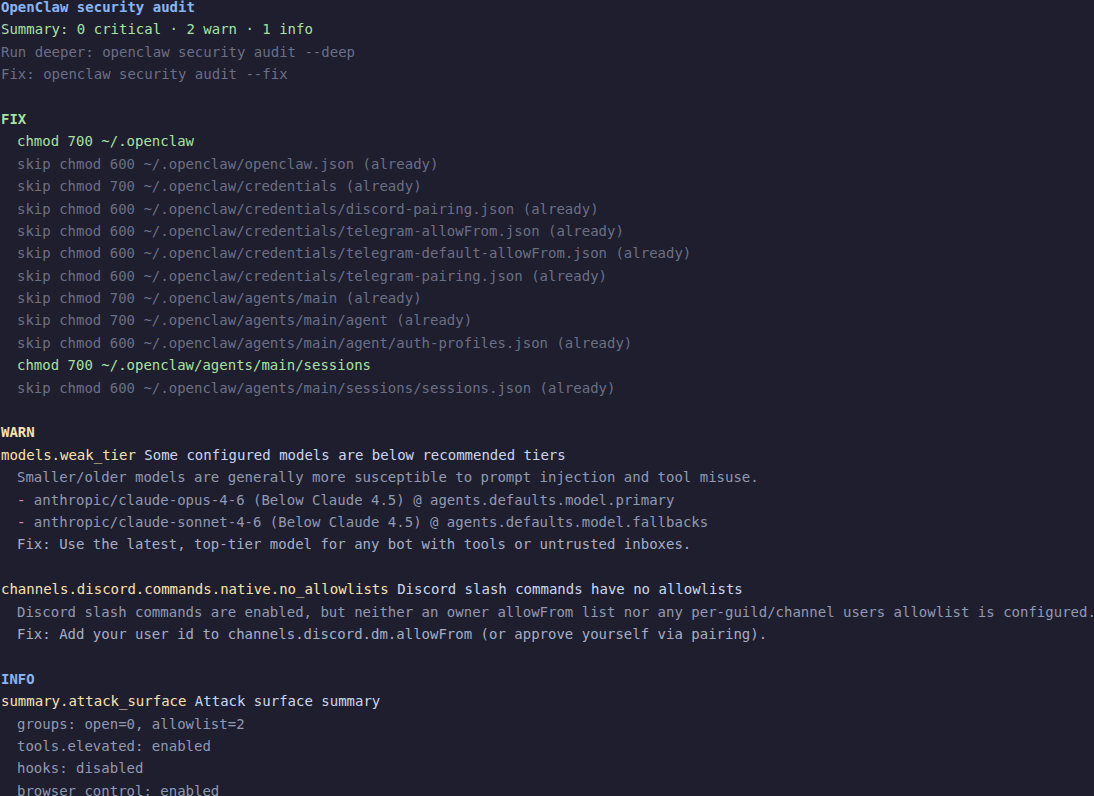
OpenClaw security audit
Summary: 0 critical · 2 warn · 1 info

FIX
  chmod 700 ~/.openclaw
  skip chmod 600 ~/.openclaw/openclaw.json (already)
  skip chmod 700 ~/.openclaw/credentials (already)
  skip chmod 600 ~/.openclaw/credentials/discord-pairing.json (already)
  skip chmod 600 ~/.openclaw/credentials/telegram-allowFrom.json (already)
  skip chmod 600 ~/.openclaw/credentials/telegram-default-allowFrom.json (already)
  skip chmod 600 ~/.openclaw/credentials/telegram-pairing.json (already)
  skip chmod 700 ~/.openclaw/agents/main (already)
  skip chmod 700 ~/.openclaw/agents/main/agent (already)
  skip chmod 600 ~/.openclaw/agents/main/agent/auth-profiles.json (already)
  chmod 700 ~/.openclaw/agents/main/sessions
  skip chmod 600 ~/.openclaw/agents/main/sessions/sessions.json (already)
Notice the "skip" lines. If a file already has correct permissions, --fix leaves it alone and tells you. The two actual changes here were chmod 700 on the state directory and the sessions directory.
What --fix does NOT change
This is the important part. --fix will never:
- Rotate or generate tokens, passwords, or API keys
- Disable tools (gateway, cron, exec, browser, etc.)
- Change your Gateway bind address or network exposure
- Remove or rewrite plugins or skills
- Modify your model configuration
Anything involving policy decisions stays in your hands. The audit reports it, you fix it.
Before and after
Run the audit before and after --fix to see the difference:
Before (3 warnings):
openclaw security auditApply fixes:
openclaw security audit --fixAfter (warnings reduced):
openclaw security auditIn this case, the fs.state_dir.perms_readable warning went away because --fix applied the chmod. The remaining warnings (model tier, Discord allowlists) need manual changes.
How do you fix common findings manually?
These are the findings --fix reports but can't resolve for you.
Gateway bound to 0.0.0.0
Check ID: gateway.bind_no_auth
Your Gateway is listening on all network interfaces without authentication. Anyone who can reach your server's IP can talk to your Gateway.
Either restrict the bind address or add authentication. Preferably both.
Option 1: Bind to localhost only (recommended for single-machine setups):
{
  "gateway": {
    "mode": "lo"
  }
}
Option 2: Keep the network binding but require a token:
{
  "gateway": {
    "auth": {
      "mode": "token"
    },
    "token": "your-strong-token-here"
  }
}
After changing config, restart your Gateway:
openclaw gateway restartDefault or weak token
Check ID: gateway.token_too_short
Your Gateway token is too short or is still the default value. Short tokens are easy to guess or brute-force.
Generate a strong token and update your config.
Generate a random token:
openssl rand -hex 20Update your openclaw.json:
{
  "gateway": {
    "token": "paste-your-new-token-here"
  }
}
Then restart:
openclaw gateway restartIf you have node hosts or other services connecting to your Gateway, update the token there too.
Overly permissive tool access
Check IDs: security.exposure.open_groups_with_elevated, tools.profile_minimal_overridden
Your agent has powerful tools (exec, filesystem access, elevated permissions) available in contexts where message senders aren't tightly controlled.
Restrict tool access per channel or use tool profiles.
You can set a minimal tool profile globally and override it for trusted contexts:
{
  "tools": {
    "profile": "minimal"
  }
}
Or restrict tools per group/channel in your channel configuration. The OpenClaw security guide covers tool policy design in detail.
File permission warnings
Check IDs: fs.state_dir.perms_readable, fs.config.perms_world_readable, fs.credentials_dir.perms_readable
Other users on the same machine can read your OpenClaw config, credentials, or session data.
Tighten permissions manually if --fix didn't catch everything:
chmod 700 ~/.openclaw
chmod 600 ~/.openclaw/openclaw.json
chmod 700 ~/.openclaw/credentials
chmod 700 ~/.openclaw/agents/main/sessions
On a single-user machine this is mostly a hygiene issue. On a shared server, it's a real risk.
Model tier warnings
Check ID: models.weak_tier
You're using a model that's below the recommended safety tier. Smaller or older models are more susceptible to prompt injection and tool misuse, according to the OpenClaw docs.
Either upgrade your model or accept the risk.
To upgrade, change your model config:
{
  "agents": {
    "defaults": {
      "model": {
        "primary": "anthropic/claude-sonnet-4-5"
      }
    }
  }
}
If you're using an older model intentionally (cost, speed, specific capability), that's a valid choice. Just know the tradeoff.
Channel allowlist warnings
Check IDs: channels.telegram.groups.allowFrom.missing, channels.discord.commands.native.no_allowlists
Your channel doesn't have sender restrictions configured. Either anyone can message your bot, or (in the Discord case) slash commands won't work for anyone because there's no allowlist to match against.
For Telegram: add your user ID to the allowFrom list, or use pairing to approve yourself. If you're getting "pairing required" errors, the gateway pairing fix guide covers every scenario.
For Discord: add your Discord user ID to the allowFrom list or configure per-guild users. The Discord error guide walks through this.
How do you use --json for CI?
openclaw security audit --jsonThe output is structured JSON:
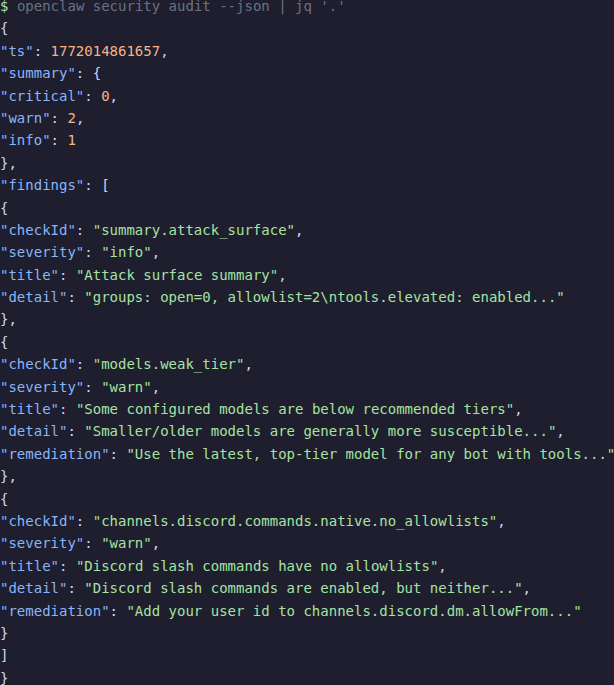
{
  "ts": 1772014861657,
  "summary": {
    "critical": 0,
    "warn": 2,
    "info": 1
  },
  "findings": [
    {
      "checkId": "models.weak_tier",
      "severity": "warn",
      "title": "Some configured models are below recommended tiers",
      "detail": "Smaller/older models are generally more susceptible...",
      "remediation": "Use the latest, top-tier model for any bot..."
    }
  ]
}
Useful jq recipes
Check if any criticals exist (for CI gate):
This returns 0 if no criticals exist:
openclaw security audit --json | jq '.summary.critical'List all critical check IDs:
openclaw security audit --deep --json | jq '.findings[] | select(.severity=="critical") | .checkId'Get a pass/fail for CI:
CRITICALS=$(openclaw security audit --json | jq '.summary.critical')
if [ "$CRITICALS" -gt 0 ]; then
  echo "FAIL: $CRITICALS critical security findings"
  exit 1
fi
Combine --fix and --json for automated remediation with reporting:
openclaw security audit --fix --json | jq '{fix: .fix.ok, summary: .report.summary}'After the audit: verify and schedule
Verify fixes stuck
After applying fixes (either via --fix or manually), re-run the audit:
openclaw security audit --deepIf the same finding appears again, the fix didn't take. Common reasons:
- Config change requires a Gateway restart
- File permissions were reset by another process
- The config file you edited isn't the one OpenClaw is reading (check with
openclaw config path)
Schedule regular audits
Run the audit after every config change. That's non-negotiable.
Beyond that, a weekly baseline is reasonable. You can automate it:
Add to crontab for weekly Monday morning audits:
0 9 * * 1 openclaw security audit --json >> /var/log/openclaw-audit.jsonWhen OpenClaw updates add new checks
New OpenClaw versions can add new security checks. After updating, run the audit again. New findings don't mean your setup got worse. They mean the tool got smarter. Read the new findings, decide whether they apply to your setup, and fix or accept them.
Keep a baseline
Save your --json output periodically. Diff it against future runs to catch drift:
Save today's baseline:
openclaw security audit --json > audit-baseline-$(date +%Y-%m-%d).jsonLater, compare against a new run:
diff <(jq '.findings[].checkId' audit-baseline-2026-02-25.json) \
     <(jq '.findings[].checkId' audit-baseline-2026-03-04.json)
Frequently asked questions
How often should I run the security audit?
After every config change. Weekly as a standing check. After every OpenClaw update, since new versions can add new checks. If you're running in CI, on every deployment.
Does --fix ever break anything?
No. It tightens defaults, nothing else. The worst case: a group that was open now requires explicit allowlist entries, which means you might need to add your user ID before messages go through again. It won't disable tools, rotate tokens, or touch network settings.
What if I get findings I don't understand?
Look up the checkId in the CLI security docs. If the remediation text isn't clear, the OpenClaw Discord community can help. You can also run with --json and inspect the full detail and remediation fields for each finding.
Can I ignore info-level findings?
They're informational, not warnings. The attack surface summary tells you what's exposed. Read it, understand it, then move on. You don't need to "fix" info findings. They exist so you stay aware of your exposure.
Does the audit check my model API keys?
No. It checks config structure and file permissions. It doesn't validate API key correctness, test model connectivity, or inspect message content. If you need to verify your API keys work, use openclaw doctor instead.
Evidence and methodology
How I tested this
I ran all three audit modes (openclaw security audit, --deep, --fix) on a production OpenClaw instance (version 2026.1.30) running on Ubuntu with the Gateway active. All terminal output in this article is from those real runs. I also inspected the audit source code to count the 78 unique check IDs and verify severity distributions.
Token values and IP addresses in output examples have been redacted.
Sources
- OpenClaw CLI Security Docs — official command reference
- OpenClaw Security Guide — broader security model and hardening
- OpenClaw GitHub Repository — source code and README
Related resources
- OpenClaw security hardening playbook — the full hardening guide this audit feeds into
- ClawHub skills: how to install without getting compromised — skill safety after ClawHavoc
- 7 proven OpenClaw security fixes — quick security wins
- OpenClaw troubleshooting: 5-command diagnostic ladder
- Fix OpenClaw installation errors
- OpenClaw gateway pairing required: 6 fixes
- OpenClaw cron jobs automation guide
- OpenClaw skills and ClawHub guide
Changelog
| Date | Change |
|---|---|
| 2026-02-25 | Initial publication |
Fixes when it breaks. Workflows when it doesn't.
OpenClaw guides, configs, and troubleshooting notes. Every two weeks.