OpenClaw Session Types Explained: Main, Isolated, and Named
OpenClaw was previously known as Clawdbot and Moltbot. This guide applies to all versions.
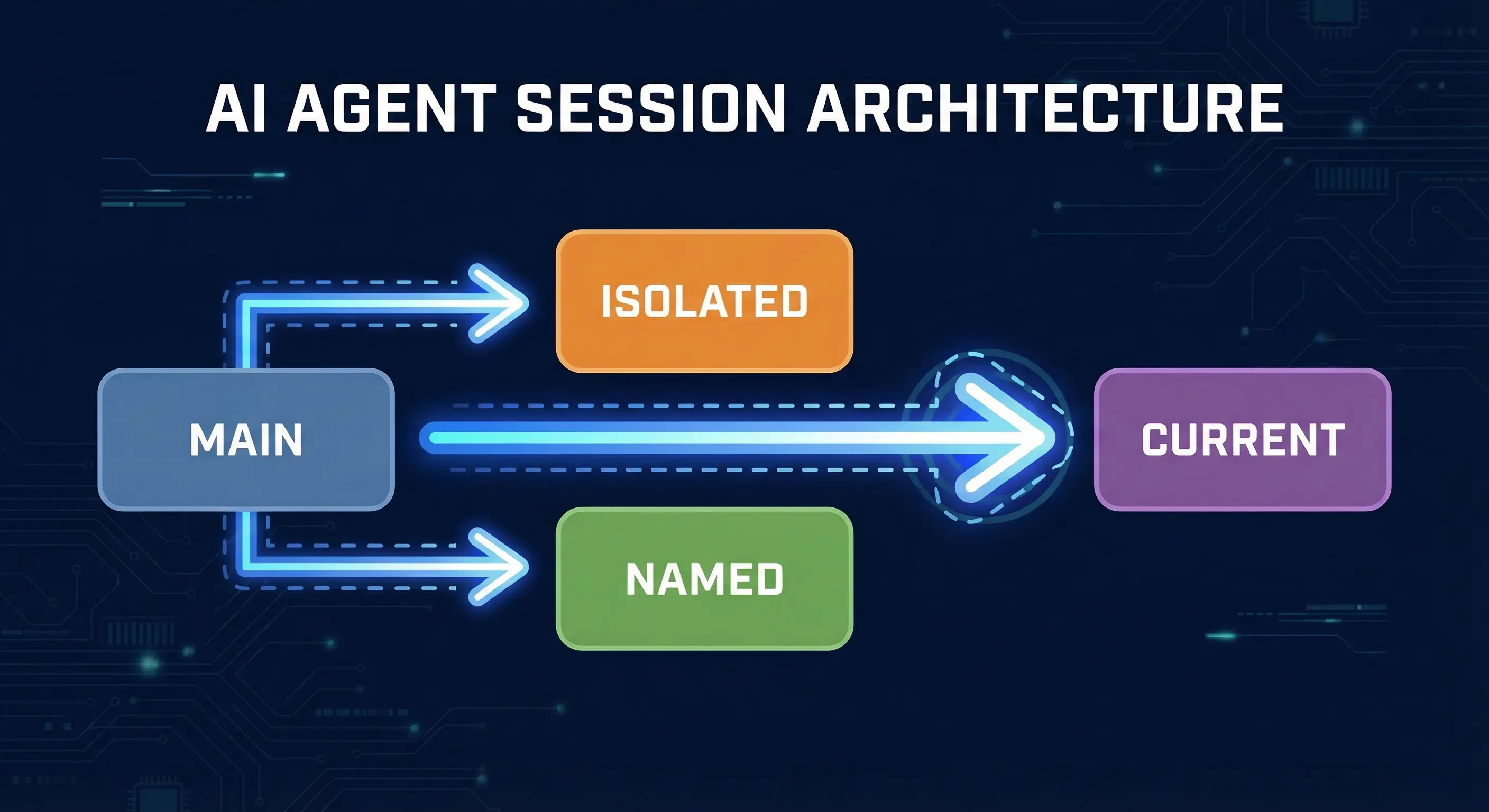
OpenClaw has four session types: main, isolated, named, and current. Learn when to use each one in cron jobs and subagents to control context and token costs.
Key takeaways
- OpenClaw has four session targets:
main,isolated,session:custom-id(named), andcurrent, each controlling whether context is shared, fresh, or persistent mainsessions accumulate all conversation history and grow your token count with every run; use them for simple heartbeat triggers, not background tasksisolatedsessions start fresh each run in their owncron:<jobId>context; they are the right choice for noisy, frequent, or parallel background work- Named sessions (
session:custom-id) persist context across runs and gateway restarts, making them the only option for stateful multi-run workflows like rolling digests - The most common mistake is using
sessionTarget: "main"withpayload.kind: "agentTurn"for non-default agents, which fails; useisolatedfor agent turns
Always review commands your agent suggests before approving them. Don't paste prompts from sources you don't trust.
Fixes when it breaks. Workflows when it doesn't.
OpenClaw guides, configs, and troubleshooting notes. Every two weeks.
What is an OpenClaw session and why does sessionTarget matter?
A session in OpenClaw is a named context window: the rolling conversation history your agent reads before each response. The gateway owns all session state and stores it in ~/.openclaw/agents/<agentId>/sessions/sessions.json. When a cron job, subagent, or incoming message triggers an agent turn, sessionTarget tells the gateway which session to load (or create).
Getting this wrong has real consequences. Run a daily summary job against the main session and you push your background task history into the same context your agent reads when you send it a direct message. Over weeks, that context window grows, token costs rise, and the model starts seeing noise it did not need.
What does sessionTarget main do in OpenClaw?
sessionTarget: "main" routes the agent turn into the default session for your agent, the same one used by direct messages. According to the session docs, the main session collapses to agent:<agentId>:main and is the default for all DMs in a single-user setup.
Use it when you want a cron job or system event to behave exactly like a message you typed: full history, full context, no isolation. It works best for simple one-shot reminders:
{
  "sessionTarget": "main",
  "payload": {
    "kind": "systemEvent",
    "event": "Reminder: review pull requests"
  },
  "schedule": { "kind": "at", "at": "2026-04-01T09:00:00Z" }
}
The critical constraint: sessionTarget: "main" is only valid for the default agent. Per GitHub issue #33155, using main with payload.kind: "agentTurn" on non-default agents throws an error at runtime. Use isolated for agent turns on non-default agents.
What does sessionTarget isolated do in OpenClaw?
sessionTarget: "isolated" creates a dedicated session scoped to the job run, keyed as cron:<jobId>. Each time the job fires, it starts with a blank slate: no prior conversation, no accumulated context. The cron jobs docs describe this as the standard approach for background work.
Key behaviors from the docs:
- The prompt is prefixed with
[cron:<jobId> <job name>]for traceability in logs - By default, the finished turn is announced back to your main channel with a brief summary
- Delivery can be set to
webhook,none, orannounce
openclaw cron add \
  --name "Morning brief" \
  --cron "0 7 * * *" \
  --tz "America/Los_Angeles" \
  --session isolated \
  --message "Summarize overnight updates." \
  --announce
Isolated is the default for agentTurn payloads and the right choice for any task where prior run history would confuse the model or inflate context costs.
One gotcha worth knowing: isolated sessions inherit skills from the global path (~/.openclaw/skills/) but not from skill files that only exist in your main agent's workspace context. This behavior is consistent with how OpenClaw resolves skill priority: workspace skills come first, then global skills at ~/.openclaw/skills/, then bundled skills. The skill priority docs and GitHub issue #32927 both confirm this resolution order. If a skill is missing in isolated runs, move it to the global skills directory.
What does sessionTarget session:custom-id (named session) do in OpenClaw?
A named session uses sessionTarget: "session:your-name-here" and creates a persistent, durable context that survives across multiple job runs and gateway restarts. Unlike isolated sessions, a named session accumulates history the same way your main session does, but it accumulates it under a separate key.
The cron docs describe this as the pattern for workflows that build on previous runs: daily standups that need to reference yesterday's summary, rolling incident timelines, research digests that grow over a week.
{
  "sessionTarget": "session:weekly-digest",
  "payload": {
    "kind": "agentTurn",
    "message": "Add today's updates to the weekly digest."
  },
  "schedule": { "kind": "cron", "cron": "0 18 * * 1-5" }
}
Each weekday run writes into the same session:weekly-digest context. By Friday, the model has the full week's history available and can produce a full summary without needing to re-fetch data.
GitHub issue #19780 notes that subagents spawned via sessions_spawn get UUID-based keys that die on gateway restart. Named sessions solve this for any workflow where you need the context to survive a restart.
The tradeoff: context grows indefinitely. Set session maintenance rules or add a periodic reset step if the workflow runs for months.
What does sessionTarget current do in OpenClaw?
sessionTarget: "current" binds the cron job to whatever session was active when you created it. At creation time, the gateway resolves "current" to the actual session key (e.g., session:telegram-chat-12345) and stores that reference. Future runs deliver their output into that specific session.
This is useful when you want a scheduled job to feel like it is running inside the chat where you set it up:
openclaw cron add \
  --name "Standup reminder" \
  --cron "0 9 * * 1-5" \
  --session current \
  --message "Time for standup. What are you working on today?"
The job fires each weekday and drops its output into your Telegram DM thread, Slack channel, or wherever you ran the command. The binding is resolved once at creation time, so if you later delete that chat thread, the delivery target may become stale.
How does sessionTarget work in OpenClaw cron jobs?
Cron jobs have two dimensions: what they run (payload.kind) and where they run (sessionTarget). The cron docs define the defaults:
payload.kind: "systemEvent"defaults tosessionTarget: "main"payload.kind: "agentTurn"defaults tosessionTarget: "isolated"
You can override either default explicitly. The combinations that matter in practice:
| Use Case | payload.kind | sessionTarget |
|---|---|---|
| Simple reminder | systemEvent | main |
| Background task | agentTurn | isolated |
| Stateful daily job | agentTurn | session:custom-id |
| Report back to a chat | agentTurn | current |
The constraint from GitHub issue #33155 bears repeating: sessionTarget: "main" with agentTurn only works for the default agent. For any named or secondary agent, use isolated or a named session.
How does session type affect OpenClaw subagents?
When you spawn a subagent with sessions_spawn or configure one in agents.json, the session handling follows the same logic as cron jobs. Subagents get their own session key (UUID-based by default) and run in isolation from the parent session.
The parent session can sessions_yield to wait for a subagent result. The subagent's output is announced back as a message to the parent. If you want the subagent to share context with the parent, you must explicitly pass relevant content in the task description. the subagent does not read the parent's history.
Named sessions also work for subagents. Giving a subagent sessionTarget: "session:research-agent" lets you build a persistent specialist agent that retains domain knowledge across multiple invocations. This is documented in GitHub issue #19780 as a requested and partially-supported pattern.
Known limitation from GitHub issue #49572: in OpenClaw 2026.3.13, an orchestrator in a cron isolated session that calls sessions_yield after spawning a subagent is aborted after exactly one follow-up LLM turn. Multi-step orchestration in cron isolated sessions is affected by this bug.
What are the token cost differences between OpenClaw session types?
Every agent turn sends the full session history as input tokens. Session type directly controls how that history grows.
main session: every cron run, every DM, every background task appends to the same context. A daily job that has been running for 30 days at 2,000 tokens per run adds 60,000 tokens of history to every future turn in your main session. That is paid twice per turn (input + caching overhead varies by provider).
isolated session: context resets each run. Token cost per run is flat and predictable. The model only sees what you explicitly pass in the message.
Named sessions (session:custom-id): context grows across runs but stays separate from your main session. You control the growth rate by what you write into the session. Add a monthly reset step to keep costs bounded.
current session: same cost profile as whatever session you bound to at creation time. For most users, that is a DM thread which accumulates history anyway.
The session maintenance docs cover pruneAfter, maxEntries, and maxDiskBytes settings for keeping any session bounded over time.
What are the most common OpenClaw session mistakes to avoid?
Using main for agentTurn on non-default agents. This throws a runtime error. Use isolated or a named session for any non-default agent turn. Per GitHub issue #33155, sessionTarget: "main" is reserved for the default agent.
Using isolated for stateful workflows. If your cron job needs to remember what it did last time, isolated is the wrong choice. Each run starts blank. Use session:custom-id instead.
Using main for noisy background tasks. Running a high-frequency scraper or log parser against the main session pollutes the context your agent reads for normal conversations. This raises token costs and can make the model give context-contaminated responses. Move background tasks to isolated.
Expecting isolated subagents to access session-scoped skills. Isolated sessions inherit from the global skills path only, per skill priority docs and GitHub issue #32927. Any skill file that only exists inside your main agent's working context is not visible to isolated runs. Move shared skills to ~/.openclaw/skills/.
Not setting session maintenance on named sessions. A named session that runs daily for a year will accumulate a very large context. Without session.maintenance set to enforce with a pruneAfter window, the session store can grow without bound.
Key terms
sessionTarget: The configuration field that tells OpenClaw's gateway which session context to use for a cron job or subagent turn. Valid values are main, isolated, current, and session:custom-id.
isolated session: A dedicated session scoped to a single job or run, keyed as cron:<jobId>. Context resets on each run with no history carryover. The default for agentTurn payloads per the cron docs.
named session: A persistent session identified by a stable custom key (session:your-name). Context accumulates across runs and survives gateway restarts, unlike UUID-based subagent sessions per GitHub issue #19780.
main session: The primary session for direct messages and conversation continuity. All DMs default to agent:<agentId>:main per the session docs.
systemEvent: A cron payload kind that enqueues a system event to run on the next heartbeat. Defaults to sessionTarget: "main".
agentTurn: A cron payload kind that runs a dedicated agent turn. Defaults to sessionTarget: "isolated".
FAQ
What is the difference between isolated and named sessions in OpenClaw?
Isolated sessions reset on every run. each cron job fire or subagent invocation starts with a blank context in a fresh cron:<jobId> session. Named sessions use a stable key like session:daily-digest and persist context across runs and gateway restarts. Use isolated for stateless background tasks and named sessions for workflows that need to remember prior results.
Why does sessionTarget main fail in OpenClaw for non-default agents?
The main session key is reserved for the default agent in OpenClaw. When a non-default agent tries to use sessionTarget: "main" with payload.kind: "agentTurn", the gateway rejects it at runtime. The fix is to use sessionTarget: "isolated" or a named session like session:your-agent-name. This behavior is documented in GitHub issue #33155.
Do OpenClaw isolated sessions have access to skills and tools from the main session?
Isolated sessions inherit skills from the global skills path (~/.openclaw/skills/) but do not have access to skill files or context that only exists inside the main agent session. OpenClaw resolves skills in priority order: workspace skills, then global skills, then bundled skills. This is described in the skill priority docs and GitHub issue #32927. If a skill works in your main session but not in isolated cron runs, move the skill file to the global skills directory. Community reports in r/AI_Agents match this behavior.
How does OpenClaw session context affect token costs in cron jobs?
Every agent turn sends the full session history as input tokens. A cron job running against the main session appends to a context that grows with every DM and background task over time. Isolated sessions reset per run, keeping token costs flat and predictable. Named sessions grow only at the rate you write to them. For cost control, use isolated for high-frequency background tasks and set session.maintenance.mode: "enforce" on any long-lived named session.
What happens to OpenClaw named sessions when the gateway restarts?
Named sessions survive gateway restarts. The session store lives at ~/.openclaw/agents/<agentId>/sessions/sessions.json on the gateway host and is reloaded on startup. Subagents spawned with UUID-based keys (the default sessions_spawn behavior) do not survive restarts because their sessions are gone. This distinction is the core motivation for using session:custom-id in persistent workflows, per GitHub issue #19780.
Evidence & Methodology
This article is based primarily on OpenClaw official docs and GitHub issues. Reddit community reports are used as supplementary color to confirm real-world behavior. No competitor tutorial sites were referenced.
- OpenClaw Session Management docs: session store structure, dmScope, maintenance settings
- OpenClaw Cron Jobs docs: sessionTarget values, payload kinds, delivery modes
- GitHub issue #33155: sessionTarget "main" restriction for non-default agents
- GitHub issue #42621: webhook hooks hardcoding sessionTarget isolated
- GitHub issue #49572: sessions_yield abort bug in cron isolated sessions
- GitHub issue #19780: persistent named sessions for subagents
- GitHub issue #32927: skill path resolution order for isolated sessions
- Reddit r/AI_Agents: community reports confirming isolated subagent skill inheritance behavior
Related resources
- OpenClaw Cron Jobs Automation Guide
- OpenClaw Persistent Memory Guide
- OpenClaw Multi-Agent Setup Guide
- OpenClaw System Prompt Design Guide
- OpenClaw Context Persistence, Savestate, and Resume
Changelog
| Date | Change |
|---|---|
| 2026-03-23 | Initial publication |
Fixes when it breaks. Workflows when it doesn't.
OpenClaw guides, configs, and troubleshooting notes. Every two weeks.