MoSCoW Prioritization When Everything Feels Must-Have
MoSCoW breaks when every feature lands in Must Have. Here are the session steps, hard conversations, and scope cuts that worked.
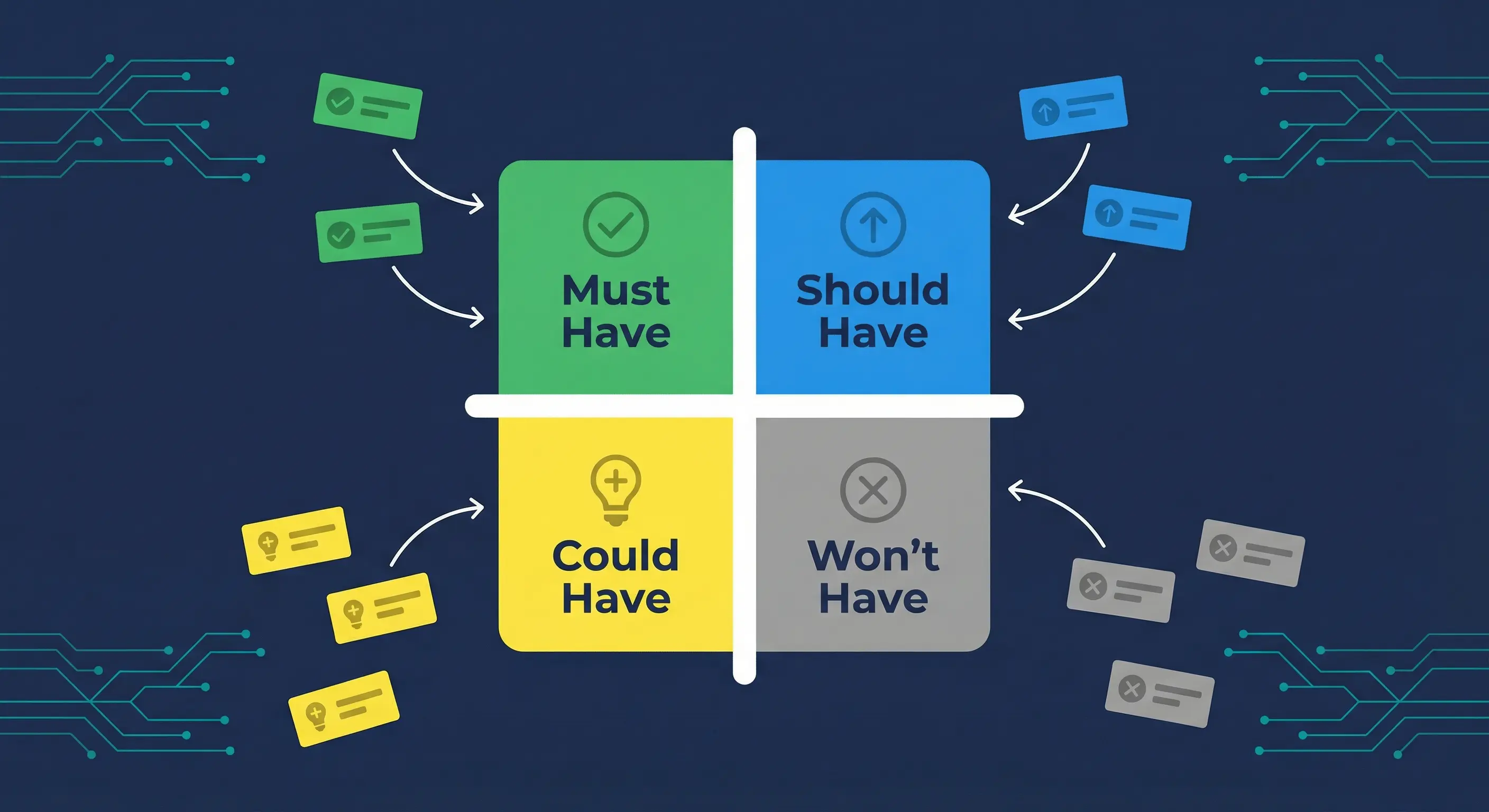
Key takeaways
- MoSCoW was designed for timeboxed delivery where the deadline is fixed and scope is the variable, not the other way around.
- Must Have inflation (every stakeholder labeling their feature critical) is the single most common reason MoSCoW sessions produce no real decisions.
- The official DSDM test: if any workaround exists, even a painful manual one, the feature is Should Have at most.
- Keep Must Have items to roughly 60% of total effort. That buffer is where your project survives schedule pressure.
- Won't Have means "not this timebox." It is a scheduling decision, not a rejection.
- MoSCoW does not rank items within a category. You need sequencing on top of it for sprint planning.
Fixes when it breaks. Workflows when it doesn't.
OpenClaw guides, configs, and troubleshooting notes. Every two weeks.
Why MoSCoW sessions fail before they start
The method is simple. The room is not. Most MoSCoW sessions break down because of one predictable problem: everyone's feature is Must Have before the discussion even begins. The framework was built for timeboxed delivery inside DSDM, where the deadline is fixed and scope is what flexes. When teams use it outside that context, or skip the hard conversations about what "Must Have" actually means, the whole exercise produces a list of priorities that aren't prioritized.
There are a few reasons this keeps happening. First, stakeholders and developers treat MoSCoW categories like priority labels in a ticket system. If you've ever worked in a project where everything is "P1," you've seen this pattern. When people know that Must Have items are guaranteed and Should Have items are not, the incentive is to classify high and justify later.
Second, teams confuse urgency with importance. A feature can feel urgent (the sales team wants it for a demo next week) without being a Must Have in the project sense. Urgency is a feeling. Must Have is a structural claim about project viability, per the DSDM Handbook.
Third, many teams run MoSCoW once at project kickoff and never revisit it. Requirements change. What was Could Have in month one might be critical by month three, and vice versa. A static prioritization list misleads the team as the project evolves.
Finally, the most preventable failure: starting the categorization before agreeing on how you'll resolve disputes. When two stakeholders disagree on whether a feature is Must Have or Should Have, who decides? If that question hasn't been answered before the session starts, the meeting stalls or the loudest voice wins.
The Must Have test that actually works
Must Have means exactly one thing: without this, there is no point deploying the solution on the target date. The Agile Business Consortium's DSDM Handbook frames it this way: ask yourself what happens if this requirement is not met. If the answer is "cancel the project," it's Must Have. If there's any other answer, it isn't.
The MUST acronym helps here. It stands for Minimum Usable SubseT. Not maximum, not ideal, not complete. Minimum. The question is not "would users want this?" The question is "is the product meaningfully broken without it?"
The most practical test is the workaround test. Ask: is there any workaround for users if this feature is missing at launch? The workaround can be manual, clunky, or temporary. It can require an export to a spreadsheet, a support ticket, or a phone call. If any workaround exists, the feature is Should Have at most. Should Have items are important and often get delivered, but their delivery is not guaranteed when the project runs tight on time.
A concrete example: a SaaS app with user authentication needs login to function at all. No workaround exists. That's Must Have. The same app's password reset via email is important, but users can contact support to reset manually at launch. That's Should Have. The bulk user import from CSV is useful, but users can add accounts one by one. That's Could Have.
This test gives you something concrete to say in the room when someone insists their feature is Must Have. "Walk me through what a user does when they need this on day one and it isn't there." If an answer exists, even a bad one, that's a workaround.
How to run a MoSCoW session step by step
A well-run MoSCoW session takes 90 minutes to two hours for a small team with a defined feature list. Here's the sequence that produces decisions.
-
Fix the timebox before anything else. Define the release date or sprint end. This is non-negotiable. MoSCoW only works when time is the constant and scope is the variable. If you enter the session thinking you can extend the deadline if too much is Must Have, the session is theater.
-
Collect all candidate features before anyone walks in. Do not let the session become a brainstorm. Everyone submits their list in advance. You compile a single master list. This is the scope you're prioritizing and nothing gets added during the session.
-
Agree on dispute resolution before voting. Decide now: does the product owner have final say? Is it a majority vote? Is there a tiebreaker? ProductPlan recommends establishing this before disagreements arise, not after tempers are up.
-
Work from Must Have down, not from Won't Have up. Start with the cancellation question. For each feature: if we launched without this, would we cancel the project or delay indefinitely? If yes, it's Must Have. Move through the list. Don't let people argue about Should Have vs Could Have yet. Finish Must Have first.
-
Apply the 60% rule. After categorizing Must Have items, sum up their estimated effort. If they exceed roughly 60% of available capacity for the timebox, something needs to move down. This is conventional DSDM guidance: Must Have should leave room for Should Have items and absorb overruns without blowing the deadline.
-
Write down Won't Have items explicitly. This step gets skipped more often than any other, and it's where scope creep re-enters. The DSDM Handbook is clear: Won't Have items are recorded in the Prioritised Requirements List to prevent them from being informally reintroduced later. If it isn't written down as Won't Have, it will come back.
-
Schedule a mid-project revisit. What's in each category should shift as you learn more. Build a checkpoint into your plan where the team reviews the categorization against actual progress.
How to run the "everything is Must Have" conversation
The session is going sideways. Half the backlog is sitting in Must Have. The deadline is fixed. You need to move things.
Start by separating the claim from the person making it. Don't ask "are you sure this is really Must Have?" That's an invitation to argue. Instead, run the workaround question as a shared exercise: "Let's figure out what users do on launch day if this isn't there yet." This reframes the conversation. The question becomes "what's the user impact of deferring it," not "is your feature important."
When someone pushes back ("users won't accept the manual workaround"), ask for evidence. Is this a known user behavior pattern? Is it a stakeholder assumption? If it's an assumption, log it as a risk and classify the feature as Should Have with a flag to validate before the deadline.
The demotion script: "Based on the cancellation test, this looks like a Should Have. The product is viable without it on day one, even if the experience isn't ideal. I'm going to move it to Should Have, and we'll confirm it gets delivered if we're on track. If we're not on track, it's the last thing that gets cut." This reframes the downgrade as a delivery preference, not a rejection. Should Have items often ship. They're just not guaranteed.
For stakeholders who game MoSCoW by arguing everything is Must Have, ask the escalation question: "If we can only ship half of this Must Have list, which five go first?" Suddenly the real priorities emerge. People can't claim everything is equal when you force an ordered list within the category.
MoSCoW examples: what real teams cut and why it worked
These are representative scenarios based on documented patterns in agile project literature. They show how the Won't Have category plays out in practice.
The SaaS auth example. A small team building a B2B product initially planned multi-role user permissions for the first release. During MoSCoW triage, they applied the workaround test: admins could add all new users as admins temporarily. The team planned to add role controls in v1.1, before the customer count grew large enough to matter. Permissions moved to Should Have. They shipped authentication on time. Role-based access launched six weeks later, after the team learned which roles customers actually used.
The indie mobile app. A solo developer building a productivity app had dark mode, push notifications, and widget support on the must-have list. During a solo MoSCoW session, they asked the cancellation question for each. Would the app be pointless at launch without dark mode? No. Without notifications? Not for the core loop. They cut all three to Could Have. The core timer and tracking functionality shipped. Dark mode arrived in the second update. The app launched on schedule.
The internal tool. A dev team building a dashboard for a customer success team had a reporting module in the plan. The customer success lead initially insisted it was Must Have. The question: "What does your team do for reporting today?" The answer: they export to a spreadsheet. Workaround identified. The reporting module moved to Should Have. The CRUD interface shipped first, and the team used the spreadsheet export path for two months while the reporting module was built properly.
What these scenarios share: the feature that felt Must Have had a workaround. Finding that workaround in the room changed the category. The team shipped the core product. The deferred feature often shipped later, and by then the team had real user feedback about what it actually needed to do.
MoSCoW limitations you need to know
MoSCoW is not a complete prioritization system. Understanding what it doesn't do will stop you from expecting more than it delivers.
The most commonly cited limitation is that it doesn't help you rank items within the same category. If you have 12 things in Must Have and can only build 10 of them, MoSCoW gives you no guidance on which two to cut. You need sequencing on top of it: ordered lists, effort estimates, or dependency mapping.
MoSCoW is also subjective. There's no objective score behind the categories. Two people can evaluate the same feature and reach different conclusions about the workaround test. This makes it susceptible to whoever has the most conviction in the room. ProductPlan notes this directly: the method doesn't include an objective approach for ranking initiatives against each other.
The Won't Have category carries ambiguity. Does "Won't Have" mean won't have in this release, or won't have ever? TechTarget identifies this as a documented weakness. Teams need to be explicit when they assign a feature to Won't Have: is this deferred to the next timebox, or is it permanently out of scope?
Finally, MoSCoW can be gamed. Experienced stakeholders who know the method know that Must Have items are guaranteed. This creates an incentive to argue for Must Have classifications regardless of actual project necessity. The facilitator needs to hold the line with the workaround test consistently, not just at the start.
When to use RICE, Kano, or story mapping instead
MoSCoW works best in a specific situation: you have a fixed deadline, you need stakeholder buy-in fast, and qualitative judgment about viability is sufficient. Outside that situation, other frameworks often serve better.
RICE scoring (Reach, Impact, Confidence, Effort) produces a numeric score for each feature. Use RICE when you need to justify decisions to leadership with data, when you're comparing many features across different teams, or when stakeholders won't accept qualitative prioritization. RICE takes longer to run but produces defensible, ordered rankings.
The Kano model separates features into basic expectations, performance features, and delighters. Use Kano when you're trying to understand which features users will notice the absence of versus which ones will create a pleasant surprise. It's more useful for product discovery than for release planning.
Story mapping arranges user stories in the order users encounter them, then slices across that map to define releases. Use story mapping when you need to visualize end-to-end user journeys and decide release slices based on user flow rather than feature importance. It's particularly useful when building something with a strong sequential workflow.
If you're starting a project and need to define the MVP scope from a PRD, the step-by-step MVP definition guide covers how MoSCoW fits into that workflow. For structuring your PRD before you run MoSCoW, the AI-ready PRD workflow template gives you the upstream document that feeds your prioritization session.
Key terms
Timebox: A fixed period with a defined deadline. In MoSCoW, the timebox is immovable. Scope is what adjusts.
Must Have: A requirement without which the project delivery is considered a failure. Also readable as MUST: Minimum Usable SubseT.
Should Have: Important but not essential. Painful to omit, but a workaround exists. Not guaranteed if the project runs tight.
Could Have: Desirable but low impact if omitted. The primary contingency pool. First to be dropped when deadlines are threatened.
Won't Have (this time): Explicitly out of scope for this timebox. Recorded to prevent informal re-entry later. Not a permanent rejection.
DSDM: Dynamic Systems Development Method. The agile framework where MoSCoW was first used extensively from 2002. The Agile Business Consortium maintains the official specification.
Must Have inflation: The pattern where teams classify too many features as Must Have, overloading the guaranteed delivery scope and undermining the prioritization exercise.
Scope creep: The uncontrolled expansion of project scope. MoSCoW's Won't Have category prevents scope creep by making exclusions explicit and on record.
FAQ
What is the 60% rule in MoSCoW prioritization?
The 60% rule is a conventional guideline from DSDM practice: Must Have items should represent no more than roughly 60% of the total estimated effort for the timebox. The remaining 40% covers Should Have and Could Have items, and is a buffer for overruns. When Must Have scope exceeds 60%, the team has no slack. Any estimate variance on a Must Have item then threatens the deadline with no room to absorb it. If your Must Have list is running over 60% of capacity, something needs to move down before the session closes.
How is MoSCoW different from High, Medium, Low priority labels?
High, Medium, and Low labels are weaker because they don't carry defined meaning. What makes something High versus Medium is subjective and varies between teams and projects. The DSDM Handbook makes this case directly: the middle option in a three-tier system allows for indecision and produces a bucket where everything ambiguous gets dumped. MoSCoW's categories carry explicit definitions tied to delivery viability and the workaround test, which forces more precise thinking about what each feature actually means for the project outcome.
Can MoSCoW be used on a solo indie project?
Yes, and it works well. On a solo project, you're both the product owner and the developer, which eliminates the stakeholder politics. But the Must Have inflation problem still exists in your own head. Solo founders regularly convince themselves that every planned feature is essential for launch. A solo MoSCoW session forces the same workaround question. "What does a user do on day one if this isn't there?" Any answer beyond "they can't use the product" puts the feature in Should Have or Could Have. Ship the minimum, validate the market, then build the rest.
What does Won't Have actually mean? Is it rejected forever?
Won't Have means "not in this timebox." It is not a permanent rejection. Wikipedia's coverage of MoSCoW and the DSDM Handbook both stress this point. Won't Have items are removed from the current delivery scope so the team can focus, and they are documented to prevent informal re-entry. In the next planning cycle, anything in Won't Have is a candidate for reconsideration. Some teams use "Won't Have this time" as the label to make this clear. The item stays in the backlog. It's just not on the table for this release.
How do you prevent stakeholders from gaming MoSCoW?
The best defense is the workaround test applied consistently. When a stakeholder classifies a feature as Must Have, ask one question. "Walk me through what a user does without this at launch." If they describe any alternative path, that's a workaround, and the feature is Should Have. A second defense is asking stakeholders to order their own Must Have items by importance before the group session. This forces them to reveal their real priorities and makes it harder to claim everything is equally critical. The forced ranking exercise within categories also works: "If we can only ship five of these eight Must Have items, which five go first?"
Evidence and methodology
This article draws on primary sources:
- MoSCoW method (Wikipedia): history, definitions, documented criticism
- MoSCoW Prioritisation, DSDM Project Framework Handbook Chapter 10 (Agile Business Consortium): the canonical specification maintained by the DSDM Consortium
- What is MoSCoW Prioritization? (ProductPlan): practitioner overview and limitations discussion
- MoSCoW Prioritization Method (ProductLift): 60% rule and session guidance
- What is the MoSCoW method? (TechTarget): limitations and practical drawbacks
The project scenarios in the examples section are representative composites based on documented MoSCoW application patterns. They are not named case studies. Named public case studies with quantified outcomes are not widely available in public literature for this framework.
Related resources
Changelog
| Date | Change |
|---|---|
| 2026-03-24 | Initial draft |
Fixes when it breaks. Workflows when it doesn't.
OpenClaw guides, configs, and troubleshooting notes. Every two weeks.