9-Phase PRD Workflow for AI Coding Tools
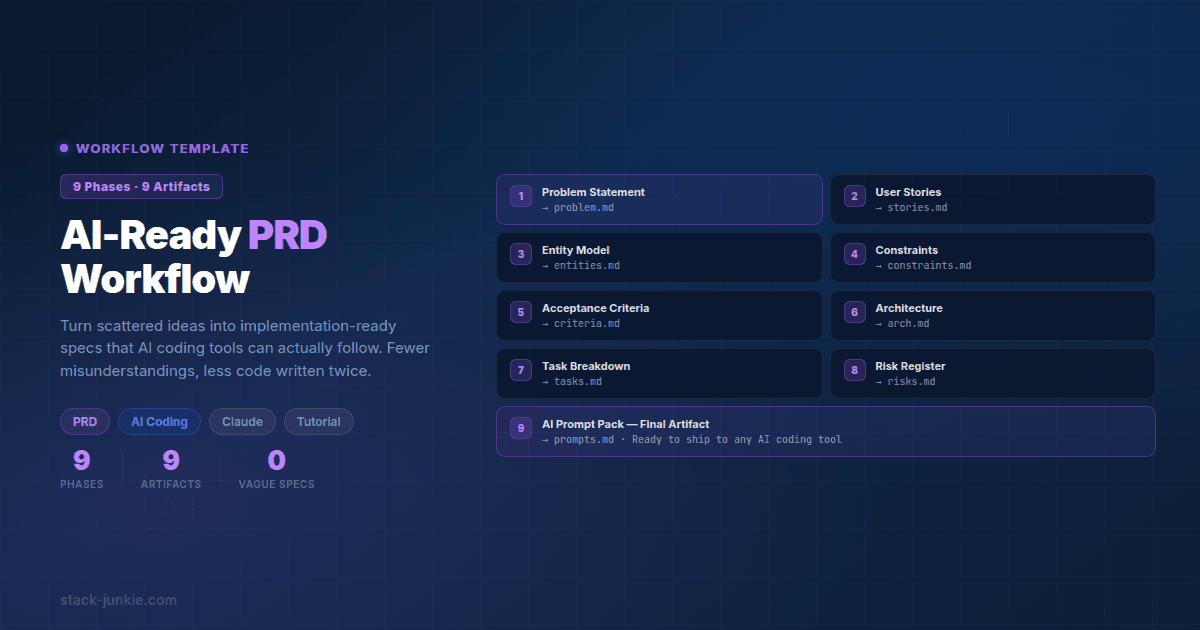
The 9-phase PRD workflow template that makes AI coding tools actually work. Turn scattered ideas into implementation-ready specs with fewer misunderstandings.
Updated: 2025-07-25
AI coding tools are capable, but they are literal. If your requirements are vague, inconsistent, or missing key constraints, the code you get back will reflect that.
This post is a planning workflow I use to turn either:
- a messy idea dump, or
- an existing PRD that is still too high level
into an implementation-ready specification that both humans and AI agents can follow.
Key takeaways
- The workflow is 9 phases and 9 artifacts. Each phase produces one concrete output you can file, review, and reuse.
- You will write less code twice if you define entities, constraints, and acceptance criteria before prompting an AI.
- After Phase 4, stop and define your MVP so you do not overload context windows and scope.
- You can copy the prompt templates below into any AI tool. They are intentionally tool-agnostic.
Fixes when it breaks. Workflows when it doesn't.
OpenClaw guides, configs, and troubleshooting notes. Every two weeks.
What this workflow is (and is not)
What it is: a repeatable way to create requirements that are specific enough for AI coding assistants to implement with minimal back and forth.
What it is not: a guarantee that AI will write perfect code. The goal is to reduce ambiguity so that failures are obvious, fixable, and caught earlier.
The 9 phases, 9 artifacts
Each phase below includes:
- Artifact name
- Definition of done (a short checklist)
- Prompt template (copy and customize)
If you already have a PRD, you can often start at Phase 3 or Phase 4.
Phase 1: Clarify the problem and user
Artifact 1: Problem Brief
Definition of done:
- One paragraph describing the problem in plain language
- Target user and their primary job to be done
- One sentence describing the desired outcome
- What is out of scope (at least 3 bullets)
Prompt template:
You are a product manager and requirements analyst.

Input (raw notes):
[PASTE YOUR BRAIN DUMP]

Task:
1) Extract the core problem statement.
2) Identify the primary user persona and their job-to-be-done.
3) List assumptions you had to make.
4) Ask me the 3 most important clarifying questions.

Output format:
- Problem statement
- Target user
- Desired outcome
- Out of scope
- Assumptions
- 3 clarifying questions
Phase 2: Define success criteria and constraints
Artifact 2: Success Criteria and Constraints
Definition of done:
- 3 to 7 measurable acceptance criteria (not implementation details)
- Non-functional constraints (privacy, performance, accessibility, reliability)
- Platform constraints (web, mobile, extension, API) stated explicitly
- Known risks and unknowns listed
Prompt template:
You are a senior product manager.

Context:
[PASTE ARTIFACT 1: Problem Brief]

Task:
Create acceptance criteria and constraints for the first shippable version.

Include:
- Acceptance criteria (as testable statements)
- Non-functional requirements
- Explicit constraints (what we must not do)
- Open questions and risks
Phase 3: Choose the technical foundation (tool-agnostic)
Artifact 3: Technical Foundation Notes
This is not about picking the "best" stack. It is about documenting the stack you will use so an AI does not invent mismatched libraries, patterns, or storage approaches.
Definition of done:
- Runtime and deployment target documented
- Storage approach documented
- Authentication/identity approach documented (even if "none")
- Major libraries/frameworks documented (or "TBD")
- Integration points documented (APIs, webhooks, third parties)
Prompt template:
You are a pragmatic software architect.

Context:
[PASTE ARTIFACT 1 and 2]

Task:
Propose a simple technical foundation suitable for a small team or solo build.

Rules:
- Prefer widely used, well-documented options.
- Keep it minimal.
- If you are unsure, mark items as TBD and list what must be decided.

Output:
- Architecture summary
- Data/storage approach
- Key libraries/frameworks (or TBD)
- Integrations
- Conventions (naming, folder structure, testing)
Phase 4: Model the domain (entities and relationships)
Artifact 4: Entity Dictionary
This artifact is where many "AI misunderstandings" disappear. If the agent knows what each entity is and what each field means, it stops guessing. Definition of done:
- List of core entities
- For each entity: purpose, field list, types, constraints
- Relationships stated (one-to-many, many-to-many)
- Validation rules and derived fields documented
Prompt template:
You are a data modeler.

Context:
[PASTE ARTIFACT 1-3]

Task:
Create an Entity Dictionary.

For each entity, include:
- Entity name
- Plain-language definition
- Fields: name, type, constraints, and purpose
- Relationships to other entities
- Validation rules

Output in Markdown.
Example output snippet (entity definition):
**Entity: ChecklistItem** - A single actionable task used to track implementation progress.

1. id (string, required) - Stable unique identifier for the item.
2. title (string, required) - Short description of the task.
3. status ("todo"|"doing"|"done", required) - Current progress state.
4. references (string[], optional) - Links to specs, files, or tickets.
Stop here and define your MVP
Before you turn your full feature set into implementation tasks, take a pass at defining the smallest version that proves value.
Phase 5: Break features into modules and responsibilities
Artifact 5: Module and Responsibility Map
This is where you turn features into a small number of modules that each have a clear purpose. Definition of done:
- Modules listed with a one-sentence responsibility
- For each module: inputs, outputs, and dependencies
- Clear boundaries (what the module does not do)
- Primary user flows mapped to modules
Prompt template:
You are a staff engineer.

Context:
[PASTE ARTIFACT 1-4]

Task:
Break the product into modules.

For each module, include:
- Responsibility statement
- Inputs/outputs
- Dependencies
- Data it owns (entities/fields)
- Error cases to handle

Keep the number of modules small. Output in Markdown.
Phase 6: Write implementation-ready requirements per module
Artifact 6: Module Specs (Implementation Notes)
This is the "AI executable" part. The key is to specify behavior, interfaces, and edge cases without turning the PRD into a full codebase.
Definition of done:
- Each module has endpoints or functions defined (signatures or contracts)
- Inputs and outputs documented with examples
- Error handling expectations documented
- File locations or package boundaries proposed
Prompt template:
You are a senior engineer writing implementation notes.

Context:
[PASTE ARTIFACT 3-5]

Task:
For each module, write a concise spec that a developer (or AI agent) can implement.

Include:
- Public API (routes, functions, commands)
- Inputs/outputs (types or JSON shapes)
- Key edge cases
- File structure suggestion

Do not generate full code. Focus on clarity and completeness.
Phase 7: Add a testing and validation plan
Artifact 7: Test Plan
If you want AI-generated code to be reliably correct, you need a way to check it. A test plan gives you that.
Definition of done:
- Test types selected (unit, integration, E2E as applicable)
- For each module: what must be tested
- Test data/fixtures approach described
- Definition of "done" for a module (passes tests, meets acceptance criteria)
Prompt template:
You are a QA lead and test engineer.

Context:
[PASTE ARTIFACT 2, 5, and 6]

Task:
Write a test plan.

Include:
- Test strategy by layer (unit/integration/E2E)
- Critical test cases per module
- Negative tests and error handling tests
- What must be mocked vs real

Output as Markdown checklists.
Example output snippet (checklist excerpt):
- [ ] Module: Auth
  - [ ] Reject requests with missing session token
  - [ ] Expire sessions after configured TTL
  - [ ] Prevent privilege escalation by role mutation
Phase 8: Create an AI context block you can reuse
Artifact 8: AI Context Block
This is the small chunk of text you paste into every AI prompt so the tool stays consistent. Definition of done:
- Under 400 to 600 tokens (short enough to reuse)
- Includes architecture, key entities, conventions, and constraints
- Includes links or pointers to where the truth lives (artifacts)
Prompt template:
You are an expert engineering assistant.

Context:
[PASTE ARTIFACT 1-7]

Task:
Create a reusable AI Context Block.

Requirements:
- Keep it concise.
- Include: project goal, user flow, tech stack choices, key entities, conventions, constraints.
- Include a short list of "do not assume" items.

Output:
- AI Context Block (copyable)
Example output snippet (context block excerpt):
Project: Habit tracker web app.
Goal: Let users create habits and check in daily.
Constraints: No third-party analytics. Store timestamps in UTC. Do not invent new entities beyond the Entity Dictionary.
Conventions: TypeScript, strict types, functions return Result<T, E> style errors.
Phase 9: Produce a build checklist for humans and AI agents
Artifact 9: Implementation Checklist
This is where planning turns into execution. You want a checklist that you can hand to:
- yourself tomorrow
- another developer
- an AI agent running tasks in sequence
Definition of done:
- Checklist grouped by module and priority
- Each task references the relevant module spec and tests
- Each task has a clear completion condition
Prompt template:
You are a technical project manager.

Context:
[PASTE ARTIFACT 5-8]

Task:
Create an implementation checklist.

Rules:
- Use Markdown checkboxes.
- Group by module.
- For each task, include references to the spec sections and required tests.
- Keep tasks small enough to be implemented in one focused AI prompt.
Downloadable template pack (Markdown)
If you want this to be repeatable, keep each artifact as its own Markdown file in your repo so it can evolve alongside the code.
Download links (static files):
- Folder path:
/static/downloads/ai-ready-prd-starter-pack/ - Starter pack README: /static/downloads/ai-ready-prd-starter-pack/README.md
Key templates:
- PRD template: /static/downloads/ai-ready-prd-starter-pack/01-prd-template.md
- Guided interview prompt: /static/downloads/ai-ready-prd-starter-pack/02-guided-interview-prompt.md
- Entity catalog template: /static/downloads/ai-ready-prd-starter-pack/04-entity-catalog-template.md
- AI context block template: /static/downloads/ai-ready-prd-starter-pack/07-ai-context-block-template.md
- Implementation checklist template: /static/downloads/ai-ready-prd-starter-pack/08-implementation-checklist-template.md
Tip: Keep the artifacts short and link between them. The value is consistency, not length.
Further reading / inspiration
- TechNomadCode, AI Product Development Toolkit: a practical collection of prompts and templates for building products with AI assistance. It pairs well with this workflow when you want more examples and reusable starting points.
- Anthropic, Prompt Engineering Interactive Tutorial: the official step-by-step guide to writing effective prompts for Claude, with hands-on exercises.
FAQ
Do I need a specific tool like Notion or Google Docs?
No. This workflow is intentionally tool-agnostic. Use Markdown in a repo, plain text files, or any editor you prefer.
Why entities and constraints first?
Because those are where ambiguity hides. If the AI has to guess what a field means or what is allowed, it will guess differently than you intended.
How detailed should the module specs be?
Detailed enough that you could hand them to a junior developer and get roughly the right shape of implementation. If you find yourself writing full code, you are usually past the point of diminishing returns.
What if I already have a PRD?
Treat your existing PRD as input. Often you can jump directly to Phase 4 (Entity Dictionary) and Phase 5 (Module map), then backfill constraints if gaps show up.
How do I use this with AI agents without blowing the context window?
Keep Artifact 8 (AI Context Block) small. Then work from the implementation checklist one task at a time, always linking back to the module spec and required tests.
Next step: turn this PRD into an MVP
Once you have Artifact 4 through Artifact 6, it is tempting to build everything. Instead, pick the smallest end-to-end flow that proves the product delivers value.
If you skipped the MVP step above, go back and define it before you start implementation tasks.
Fixes when it breaks. Workflows when it doesn't.
OpenClaw guides, configs, and troubleshooting notes. Every two weeks.