Clinejection AI Supply Chain Attack: What Actually Happened
How a prompt in a GitHub issue title hijacked the Cline AI bot, poisoned its release pipeline, and pushed a trojanized npm package to 4,000 developers
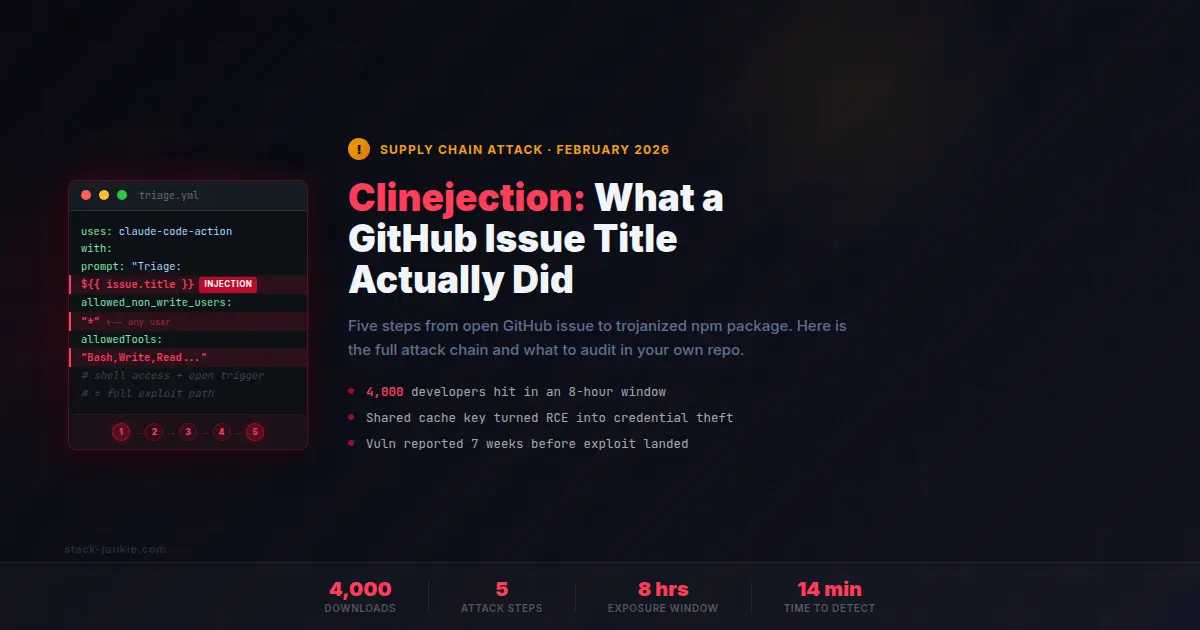
In February 2026, a GitHub issue title triggered a chain reaction that put a trojanized npm package on 4,000 developer machines. The title was an injected prompt. Cline's AI triage bot read it, obeyed the embedded instructions, and set off a five-step attack that ended with a malicious publish. The payload wasn't destructive, but the attack path is real.
Key takeaways
- A GitHub issue title hijacked Cline's AI bot because the title was inserted verbatim into the agent's prompt, and the agent had full shell access.
- Sharing cache keys between a low-privilege triage workflow and a high-privilege release workflow turned code execution into credential theft.
- Security researcher Adnan Khan discovered and reported the vulnerability on January 1, 2026. Cline didn't respond for seven weeks. A separate actor found the proof-of-concept and weaponized it.
- About 4,000 developers downloaded the compromised
cline@2.3.0package during an eight-hour window on February 17, 2026. Only the npm CLI package was affected. VS Code and JetBrains extensions were not. - Any repo with an AI agent that processes untrusted input and touches production workflows is exposed to the same attack class.
Fixes when it breaks. Workflows when it doesn't.
OpenClaw guides, configs, and troubleshooting notes. Every two weeks.
Table of Contents
- What happened: the Clinejection attack in plain language
- The five-step attack chain
- Why these misconfigurations happen
- The disclosure timeline and what went wrong
- Audit checklist: what to check in your own repo
- The bigger pattern: AI installs AI
- Key terms
- FAQ
- Evidence and methodology
- Related resources
- Changelog
What happened: the Clinejection attack in plain language
Cline is an AI coding tool with over 5 million users. On December 21, 2025, the team added an automated issue triage workflow using claude-code-action. The idea was straightforward: let an AI agent read new issues and respond with labels or comments, reducing the load on maintainers. For context on how claude-code-action works in practice, see the Claude Code complete guide.
The workflow had two configuration problems. It accepted trigger requests from any GitHub user. And the AI agent had full shell access, including the ability to run arbitrary Bash commands. When a new issue was opened, the issue title went directly into Claude's prompt, without sanitization.
On January 28, 2026, an attacker opened Issue #8904 with a title crafted to look like a system instruction. It told Claude to fetch and execute a shell script from a typosquatted repository: glthub-actions/cline (note the missing 'i' in "github"). The attacker controlled that repo. Claude ran the script.
That script did one thing: poison the GitHub Actions cache in a specific way that let a higher-privilege workflow read the compromised cache entry during a release build. The release workflow ran, pulled the poisoned cache, and used stolen credentials to publish cline@2.3.0 to npm. The package included a postinstall script that ran npm install -g openclaw@latest silently on every install.
The compromised package was live from 3:26 AM to 11:30 AM PT on February 17, 2026, roughly eight hours. About 4,000 downloads happened in that window. StepSecurity's monitoring flagged the anomaly 14 minutes after publication.
The five-step attack chain
Each step depends on the one before it. None of these individual misconfigurations is catastrophic in isolation. Together they form a complete exploit path from GitHub issue to malicious npm publish.
Step 1: The open door (prompt injection via issue title)
The triage workflow was configured with allowed_non_write_users: "*", meaning any GitHub account could open an issue and trigger the agent. That's standard for a public project. The problem is that the issue title went directly into the prompt:
with:
  prompt: "Triage this issue: ${{ github.event.issue.title }}"
No escaping. No truncation. No role boundary separating the title from the actual instructions. If your prompt is Triage this issue: [user input], then the user controls part of your prompt. And if the agent has shell access, the user controls what your agent executes.
The agent's tool access was set to --allowedTools "Bash,Read,Write,Edit,Glob,Grep,WebFetch,WebSearch". Arbitrary command execution, file writes, and network access. All of it available to whoever opened an issue with the right title.
Step 2: The payload delivery (AI executes the injected command)
The attacker's issue title told Claude to fetch and run a script from the typosquatted repo. Security researcher Adnan Khan had already confirmed this behavior on his own test mirror before the attack: Claude "happily executed the payload in all test attempts".
That's the core of the problem. The agent has no mechanism to distinguish a legitimate instruction from an injected one, because both arrive in the same string. Whoever controls part of the input controls what the agent does. The typosquatted repo (glthub-actions/cline) was designed to avoid detection on a quick glance. The script it served had one job: set up the cache poisoning that made the next step possible.
Step 3: The cache poisoning (shared cache key abuse)
GitHub Actions allows workflows to cache dependencies between runs to speed up builds. Both the triage workflow (low-privilege, triggered by any issue) and the release workflow (high-privilege, publishes to npm) used the same cache key pattern:
${{ runner.os }}-npm-${{ hashFiles('package-lock.json') }}Same key. Same package-lock.json hash. Same runner OS. When the triage workflow wrote a poisoned cache entry, that entry was readable by the release workflow on its next run.
There's a catch though. GitHub cache entries can't be overwritten once set. To replace the legitimate cache, the attacker needed to evict it first. This became viable after GitHub changed its LRU cache eviction policy on November 20, 2025: repos exceeding 10GB now have entries evicted immediately rather than on a delay. The script used Cacheract, a tool that automates cache flooding. It generated enough entries to push the repo past 10GB, evicting the legitimate cache. Then it wrote the poisoned replacement.
The next time the release workflow ran, it pulled a compromised build cache.
Step 4: The credential theft (nightly token reuse)
Cline ran a nightly workflow to publish pre-release builds. That workflow had access to three credentials: NPM_RELEASE_TOKEN, VSCE_PAT, and OVSX_PAT. These tokens were used for nightly convenience builds, but their permission scope was identical to the production publish credentials. No separation between "publish a nightly draft" and "publish to stable."
When the nightly workflow ran on the poisoned cache, an injected build step read those environment variables and exfiltrated them to the attacker.
Step 5: The malicious publish (trojanized npm package)
With valid npm credentials, the attacker published cline@2.3.0 using the clinebotorg account, bypassing Cline's normal OIDC trusted publishing flow. The package was missing npm provenance attestations, which is what StepSecurity's tooling flagged 14 minutes after publication: a package from a project that historically used OIDC, suddenly published without provenance and from a different account.
The payload in package.json:
"scripts": {
  "postinstall": "npm install -g openclaw@latest"
}
Per the official GitHub Security Advisory GHSA-9ppg-jx86-fqw7, only the npm CLI package was affected. The VS Code extension and JetBrains plugin install through a separate path and were not compromised. OpenClaw (previously known as Clawdbot and Moltbot) is not malicious software, and the install doesn't auto-start the Gateway daemon, which is why Endor Labs assessed the overall impact as low. For more on OpenClaw's security posture, see the Malwarebytes report review.
Why these misconfigurations happen
None of these decisions sounds reckless on its own.
Opening issue triggers to all users is how open source works. Adding AI automation to reduce maintainer burden is a reasonable thing to do. Giving the agent tools so it can actually take action is the whole point of the feature. Sharing a cache key across workflows saves CI minutes. Using the same token for nightly builds as production is a lazy shortcut most teams don't think twice about.
The problem is composition. Each decision was made independently. Nobody drew out the full dependency chain before shipping. Prompt injection is still a young threat model, and most developers writing GitHub Actions workflows don't think of ${{ github.event.issue.title }} as an input that needs sanitization. It reads like metadata. It also reads like an attack surface once you know what to look for.
As Snyk observed, the pattern is a "toxic flow": untrusted data reaching an AI agent that has tool access. The flow looks completely normal until you trace it end to end. By then, if you haven't thought about it in advance, it's too late.
The disclosure timeline and what went wrong
The attack didn't have to land the way it did.
Adnan Khan discovered the vulnerability on December 21, 2025 and submitted the GHSA report on January 1, 2026. He received no response. Over the following five weeks, he made multiple follow-up attempts. Still nothing.
Khan published his full findings on February 9, 2026. Cline patched within 30 minutes of public disclosure, removing the AI triage workflows.
It wasn't Khan who ran the exploit. Someone else had found his proof-of-concept sitting in a test repository and weaponized it independently. The attack on February 17 happened after the patch, using credentials stolen before it. The patch closed the injection surface. It didn't invalidate credentials that had already been exfiltrated.
Then the response got worse. On February 10, Cline deleted the wrong npm token, leaving the exposed one still active. They corrected this on February 11. The bad actor published cline@2.3.0 in the window between those two events.
The lesson here isn't about patching fast. It's about incomplete incident response. When you find a credential-based vulnerability, rotation means rotating the right credentials before they're used.
Audit checklist: what to check in your own repo
If your GitHub repo has any AI workflow that processes untrusted input, work through this list.
1. Who can trigger your AI workflows?
Any workflow triggered by issues, pull_request, or issue_comment events can be triggered by any GitHub user. If that workflow feeds user-controlled input into an AI agent, you have an injection surface. Restrict triggers with allowed_non_write_users or move the AI automation behind a collaborator-only gate.
2. What tools can your agent access?
Check your --allowedTools configuration. If it includes Bash or Write, the agent can run commands and modify files. That's appropriate for some use cases and dangerous in others. For issue triage, the agent probably needs only Read and WebSearch. Remove every tool the agent doesn't specifically need for that workflow.
3. Are your cache keys shared between low-privilege and high-privilege workflows?
Check every actions/cache step in your repo. If any two workflows use the same key pattern, a low-privilege workflow can write a cache entry that a high-privilege one reads. Fix it by including the workflow name in the key prefix:
# Before (shared key, vulnerable)
key: ${{ runner.os }}-npm-${{ hashFiles('package-lock.json') }}

# After (workflow-scoped, safe)
key: release-${{ runner.os }}-npm-${{ hashFiles('package-lock.json') }}
4. Do your nightly or pre-release workflows use the same credentials as production?
Scope your tokens. A token that publishes nightly drafts doesn't need access to the stable channel. Use scoped npm access tokens, not org-wide ones. Rotate immediately if any workflow runs with production-scoped credentials on untrusted input.
5. Does your npm publishing use OIDC trusted publishing?
Publishing with a long-lived stored token means that token is a standing target. OIDC trusted publishing via GitHub Actions generates short-lived credentials per run. There's no persistent token to steal. Cline switched to this after the incident.
6. Are your npm packages published with provenance attestations?
Packages published without provenance can be published by anyone with the right token, without a traceable GitHub Actions run. StepSecurity's tooling flagged the anomaly in 14 minutes precisely because cline@2.3.0 lacked attestations that prior versions had. Enable provenance with npm publish --provenance.
7. Does untrusted user input appear in prompts without a role boundary?
Check every place where a GitHub event field (title, body, comment) is interpolated into a prompt. Sanitize it (truncate, strip unusual characters) or wrap it in a role marker that your LLM provider honors. Treat issue titles and PR body text the same way you'd treat form input in a web app. It's injection if it's unsanitized.
8. Is your security disclosure process defined?
If someone sends you a security report today, who handles it, in what timeframe, with what escalation path? A five-week non-response while a live exploit chain sits open is not acceptable for any project with millions of users. Add a SECURITY.md file. Monitor the inbox. Define a response SLA.
For a deeper look at securing an AI agent setup, the OpenClaw security audit guide covers related concepts around agent permissions, credential handling, and workflow isolation.
The bigger pattern: AI installs AI
The grith.ai writeup named it well: AI installs AI. The payload was OpenClaw, another AI agent platform. A developer's AI coding tool installed a separate AI infrastructure package, without asking, without consent, without any indication in the install output.
There's a structural gap underneath all of this. AI agents authenticate who called the API. They don't verify whether the requested action was actually authorized by the person who owns the system. The Cline issue triage bot was legitimately authorized to exist and to read issues. It was not authorized to fetch and execute scripts from unknown repositories. But from the agent's point of view, the instruction looked the same as any other. The prompt said to do it. The agent did it.
The Snyk analysis frames this as a "toxic flow": untrusted data combined with AI tool access equals an exploit path. The solution isn't to avoid AI agents in CI/CD. It's to apply the same threat modeling you'd apply to any other system that processes external input with privileged access.
The SQL injection era created a generation of developers who reflexively parameterize queries. We're in the early phase of the same education cycle for prompt injection. The attacks are landing now. The safe defaults haven't caught up yet. One Hacker News commenter put it plainly: "All this Wild West yolo agent stuff is akin to sql injection shenanigans of the past."
Harsh. Mostly right. The good news is we know exactly how to fix it.
Key terms
Prompt injection is a class of attack where untrusted user input is incorporated into an AI model's prompt in a way that overrides or extends the model's original instructions. It's analogous to SQL injection, but targeting language model behavior rather than database queries.
Cache poisoning (GitHub Actions) is a technique where an attacker writes a malicious entry to a shared workflow cache, which a more-privileged workflow then reads during its build process. The attack requires shared cache keys between workflows with different trust levels.
OIDC trusted publishing is an authentication mechanism for npm that replaces long-lived stored tokens with short-lived credentials generated per GitHub Actions run. The credential exists only for the duration of a specific workflow execution, eliminating the standing token as an attack target.
npm provenance attestation is a cryptographic record linking a published npm package to the specific GitHub Actions run that built it. Packages published without provenance can be pushed without a traceable workflow invocation, making anomaly detection harder.
Cacheract is a tool developed by security researcher Adnan Khan that automates GitHub Actions cache flooding and poisoning. It demonstrates the class of vulnerability that arises when workflows share cache key patterns across different privilege levels.
FAQ
Was Adnan Khan the attacker?
No. Khan discovered the vulnerability and reported it through proper disclosure channels on January 1, 2026. A separate, unidentified actor found his proof-of-concept in a test repository and weaponized it independently. Khan was not involved in the actual attack.
Did this affect the Cline VS Code extension?
No. The official security advisory confirms that only the npm CLI package was affected. The VS Code extension and JetBrains plugin install through a different path and were not compromised.
Is OpenClaw malware?
No. OpenClaw is a legitimate AI agent platform. The Clinejection payload installed it without user consent or any disclosure, and that's the problem. The software itself isn't malicious, and the install doesn't auto-start the Gateway daemon. Endor Labs assessed the overall impact as low for that reason. See the Malwarebytes report review for a detailed look at OpenClaw's security posture.
What should I do if I installed cline@2.3.0?
Uninstall OpenClaw if you don't want it: npm uninstall -g openclaw. Update to cline@2.4.0 or later, which is clean. Review your system for unexpected background processes. Given that the payload was a legitimate software install rather than a credential stealer, the risk to most affected developers is low.
How was this detected so fast?
StepSecurity's monitoring flagged the anomaly 14 minutes after publication. The trigger was a provenance mismatch: cline@2.3.0 was published by the clinebotorg user account, while all previous Cline releases used OIDC trusted publishing with npm provenance attestations. A package that historically had attestations, suddenly missing them and published from a different account, is a high-confidence anomaly signal.
Evidence and methodology
Research for this article drew from Adnan Khan's original disclosure post (the authoritative technical source), the official GitHub Security Advisory GHSA-9ppg-jx86-fqw7, StepSecurity's first-party detection writeup, Snyk's analysis, The Hacker News coverage, and the grith.ai incident reconstruction. Where sources conflict, Khan's primary account takes precedence. The botched credential rotation detail (wrong token revoked February 10, corrected February 11) appears in the grith.ai writeup and is not disputed by other sources. The specific Issue #8904 number comes from grith.ai and may not be independently verifiable if the issue was deleted; it's presented with that caveat. Claims about the OpenClaw impact assessment are sourced to Endor Labs via The Hacker News.
Related resources
- Clinejection: Compromising Cline's Production Releases by Adnan Khan (primary disclosure)
- Official Cline Security Advisory GHSA-9ppg-jx86-fqw7
- StepSecurity: Cline Supply Chain Attack Detected
- Snyk: How Clinejection Turned an AI Bot into a Supply Chain Attack
- grith.ai: A GitHub Issue Title Compromised 4,000 Developer Machines
- The Hacker News: Cline CLI 2.3.0 Supply Chain Attack
- Is OpenClaw Safe? Malwarebytes Report Reviewed
- OpenClaw Security Audit Guide
- Claude Code Complete Guide
Changelog
| Date | Change |
|---|---|
| 2026-03-06 | Initial publish |
Fixes when it breaks. Workflows when it doesn't.
OpenClaw guides, configs, and troubleshooting notes. Every two weeks.